You are currently working on UAT 

Two functions not working in Studio 2017 after the install of CU 16

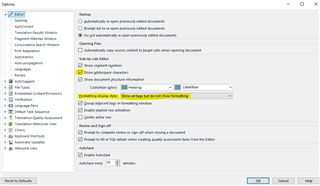
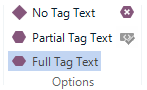
I just installed Cumulative update 16 to Studio 2017. Two functions are lost: “Show Whitespace Characters” and “Toggle display of formatting tags”. The whitespace characters are showing in the Translation results window, but not in the editor itself. I cannot see the formatting tags at all, but they are visible when I choose “Edit Translation Unit” in the Translation results window.

The project I am working on was started in CU 15, but it doesn’t help to create a completely new project. I have tried with another file, but it looks like I cannot get these to functions to work at all.

These two functions are important. I really need them back.

Parents Reply
  • The usual setting under “Formatting Display Style” is “Show formatting but hide recognized formatting tags”. In CU 15, I was able to toggle between showing and not showing formatting tags, but this does not work in CU 16.

    I thought this was only a routine update, so I decided to get it done on my laptop after lunch today, despite the fact that I have four revision assignments that I have to do in Studio until Thursday. That was obviously a big mistake as I now have lost valuable working time. Frowning2

    New decision: I have to change to my desktop computer with CU 15 at home right away and leave the office. I cannot work on these projects without having these functions working properly, at least not the toggling of formatting tags. It seems that the installation of Studio on my laptop is not possible to use for the time being.

    Alison: One again thank you for your efforts.

    /Peter

Children