You are currently working on UAT 

Two functions not working in Studio 2017 after the install of CU 16

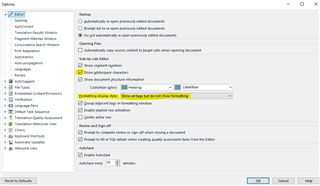
I just installed Cumulative update 16 to Studio 2017. Two functions are lost: “Show Whitespace Characters” and “Toggle display of formatting tags”. The whitespace characters are showing in the Translation results window, but not in the editor itself. I cannot see the formatting tags at all, but they are visible when I choose “Edit Translation Unit” in the Translation results window.

The project I am working on was started in CU 15, but it doesn’t help to create a completely new project. I have tried with another file, but it looks like I cannot get these to functions to work at all.

These two functions are important. I really need them back.

Parents Reply Children
  • The usual setting under “Formatting Display Style” is “Show formatting but hide recognized formatting tags”. In CU 15, I was able to toggle between showing and not showing formatting tags, but this does not work in CU 16.

    I thought this was only a routine update, so I decided to get it done on my laptop after lunch today, despite the fact that I have four revision assignments that I have to do in Studio until Thursday. That was obviously a big mistake as I now have lost valuable working time. Frowning2

    New decision: I have to change to my desktop computer with CU 15 at home right away and leave the office. I cannot work on these projects without having these functions working properly, at least not the toggling of formatting tags. It seems that the installation of Studio on my laptop is not possible to use for the time being.

    Alison: One again thank you for your efforts.

    /Peter

  • Hi 

    It is always best to leave updates until after urgent work has been done. Once you've delivered these jobs, I suggest you reinstall Studio on your office machine.

    If that does not solve the problem you can then go to SDL Installation support for help free of charge, here:

    Installation support

    Fill out the form, give them an accurate email address to contact you on and select 'Installation' from the Case Type dropdown. You can explain what you've already tried.

    This is an odd set of behaviour. I'd be interested to hear what SDL Support find to solve it. If you could kindly post it here, it would be useful for future users who experience a similar issue.

    All the best,

    Ali Slight smile

  • Yes, I have learnt a lesson now. This is actually the first time I encounter a severe problem of this kind after the installation of a cumulative update.

    I always have Studio ready on my desktop computer at home if I for one reason or the other cannot use it on my office laptop. All the other software I need to be able to perform my work is also available on my desktop at home. I only need to copy the files. In this business, you always have to be prepared. Wink

    I have not much time to deal with this right now as I am on a journey from Friday until next Monday. I will be working a few days next week, but then I will be gone for two weeks. I will probably have to work from home on my desktop until I can find time to deal with this matter.

    I haven’t seen any comments about this problem from any other Studio 2017 users. Am I the only one with this behaviour from the software?

    I will check this forum again to see if something new comes up. If not, I will contact the SDL support as you suggested.

    /Peter

  • Hi 

    The behaviour you describe is very unusual. In all the time I've been working with SDL Studio (from the first version) I haven't seen this happen or to have been reported to happen on the SDL Community.

    , have you seen this before?

    All the best,

    Ali Slight smile

  • Hello again Alison,

    I am at home now, using Studio 2017 without CU 16 installed on my desktop computer after having copied all the files I need. The software behaviour here is normal. I have checked all the settings and they are the same as on my laptop I use in the office with CU 16 installed.

    I have been using Studio for five years since version 2014. This is the first time ever a Studio problem after installing a cumulative update forces me to work from home. I use Studio for 98 percent of the work I perform, mostly revisions, and it is almost impossible to do it without being able to use these two functions, especially when I have complex formatting to handle.

    I cannot return to the office until Studio is fixed.

    Regards,
    Peter

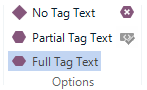
  • I came across a workaround for the type of tag display (No Tag Text, Partial Tag Text, etc.).
    1. I make my selection as usual on the ribbon; the display stays the same.
    2. I close and then open the file; the change I made in step 1 is implemented.

    EDIT: The same workaround applies to the Show Whitespace button--click the button, close and reopen the file.

  • Hi

    Indeed, this works for quite a few settings changes that don't 'take' until the file is closed and opened. It might well make the display selections work on closing and reopening but it isn't the normal behaviour I would expect of Studio for toggling of any function/setting.

    It's 's toggle display function that doesn't work whether it's whitespaces or tags he's trying to turn on or off, and the whole point of a toggle is that you can use it 'on the fly', so it's not a solution when it means constantly closing and reopening a file, which takes time.

    All the best,

    Ali Slight smile

  • I interpret Joel Earnest’s message as he is experiencing the same software behaviour as I. I have to be able to toggle these two functions on the fly continuously, which means my office laptop is not possible to use for the time being until there is a solution for this problem.

    If it is a general bug in Studio 2017 CU 16 I better continue working at home on my desktop for the time being without installing CU 16. A complete fresh install of Studio on the laptop will probably not help. The complete reset I did yesterday did not solve the problem.

    /Peter

  • A complete fresh install of Studio on the laptop will probably not help.

    Hi

    The point is that if a fresh install of Studio doesn't help, it will ultimately lead to help because if that does not work, you can then get free help with installation issues that are preventing you from working, pretty fast:

    Fill in the form here:
    Select 'Installation' from the 'Case type' dropdown and tell them that the problems still occur after reinstallation and, most importantly, give your correct email address so that they can contact you.
    They then can arrange remote access to your computer with you to take a look at what is causing this, and hopefully resolve it.
    Please do try that and come back and tell us what finally was the solution...
    You could take your laptop into the office and work with that while you run the reinstallation and then if necessary contact the help service and wait for their reply. It would be so much better to get this sorted before you go away, for peace of mind...
    All the best...
    Ali Slight smile
  • Thank you again Ali, for your efforts. Unfortunately, I have no time at all to spend on this problem now. I have way too much work to finish this week and next week. The only possible solution right now would be to downgrade Studio on the office laptop to CU 15. I could also upgrade to Studio 2019, but that is an even larger project and has to be done on both computers.

    If this is a general problem of this CU, I suppose the team at SDL will look into this sooner or later. For the time being, I have no other choice than using my desktop at home.

    /Peter