You are currently working on UAT 

Two functions not working in Studio 2017 after the install of CU 16

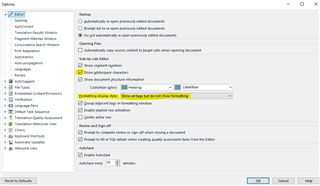
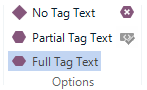
I just installed Cumulative update 16 to Studio 2017. Two functions are lost: “Show Whitespace Characters” and “Toggle display of formatting tags”. The whitespace characters are showing in the Translation results window, but not in the editor itself. I cannot see the formatting tags at all, but they are visible when I choose “Edit Translation Unit” in the Translation results window.

The project I am working on was started in CU 15, but it doesn’t help to create a completely new project. I have tried with another file, but it looks like I cannot get these to functions to work at all.

These two functions are important. I really need them back.

Parents Reply
  • Thank you, Alison, for your answer and suggestions. I tried to reset the window layout, I ran a repair install and rebooted the computer. Unfortunately, I still lack the possibility to show whitespace characters in the editor and to display formatting tags.

    I can see whitespace characters in the Translation Results window, but I cannot see the formatting tags at all. The latter is a problem as I am working with a file with some segments having heavy formatting. I really need to see all the tags when I edit in order to not make any mistakes.

    MultiTerm is updated as well. Everything else seems to be working except these two issues.

    /Peter

Children