You are currently working on UAT 

Original text in target file

When are you going to repair this highly annoying and time wasting bug with original text suddenly cutting in to the target file after export (and the text subsequently being original), for no apparent reason, in a seemingly non-problematic portion of the text, with NO ERRORS in the project whatsoever?

It's been there in 2011, and it is here in 2019 SP1. What exactly is taking you 8 years to fix this?

Parents


  • It would help if you provided some evidence of this so we could understand why it's happenning? Can you provide the source file and your sdlxliff?

    Paul Filkin | RWS

    Design your own training!
    You've done the courses and still need to go a little further, or still not clear? 
    Tell us what you need in our Community Solutions Hub

  • Paul,

    You know troubleshooting with specific files ain't easy in this industry due to NDAs. All I can say is the file was really straightforward, with mostly just plain text in .docx (not a PDF conversion, to my knowledge).

    How about we just jump back in time to 2015:


    www.proz.com/.../280517-generated_translation_half_in_source_text_half_in_target_text.html

    Same problem (with Studio 2009 - so, wow, it's been 10 years with the same unresolved problem now!). You posted in that thread then. Did the devs investigate into the problem at all throughout all those years? You know the problem has been occurring for many people, as it has for me (numerous times throughout the years, and always taking quite a lot of time to fix). I remember reading other peoples' posts some years ago with exactly the same problem. What conclusions did the devs arrive at?

  •  

    Nothing is so straightforward.  These things are always due to something unexpected in the file and just because you see this same error message again it doesn't mean it's for the same reason.  If only life was that simple.

    I have offerred to investigate this for you and can't do more than that.  For the development team to be able to fix anything we need to be able to verify that this is a really a problem that the software can be expected to be able to handle, this isn't always the case, and we need to be able to cut down the file to something that can do this for us so the dev team know where to focus their attention.

    In reality it would probably be trivial for you to at least try the following if you would like us to investigate this:

    1. Split the file until your left with a small section that behaves this way, then anonymize the text, or

    2. Run a pseudo-translate on the file so the text is nonsense, save the target then anonymize what's not handled and send us the file

    But it's your call Adrian.  We're trying to help.


    Paul Filkin | RWS

    Design your own training!
    You've done the courses and still need to go a little further, or still not clear? 
    Tell us what you need in our Community Solutions Hub

  • Trados is what, 20 years old now? And you're telling me "there's always something unexpected" in files that you haven't been able to sort out for at least 10 years now? Jesus, how many scenarios can there be? Do you fire your entire dev team every year and then hire a new one, preventing the staff from gathering experience and keeping debugging records?


    The thing is I don't really need your help per se - I had to do a time-wasting and disadvantageous workaround to meet the deadline, as always. Even if you helped me with this particular file, I would probably need help again some time in the future, when I run into "something unexpected". And this time, instead of wondering whether this is something "that the software can be expected to be able to handle", I'll just switch to more reliable competition (MemoQ), without looking back.


    Tried to pseudo-translate the project but nothing came out of it. Do the segments need to be cleared first? 

  •  

    A lot more scenarios than you might think. Studio is made up of millions of lines of code and we are always dealing with moving parts that can come from the operating system, third party software, the files you handle, and also from Studio itself. Just because you get the same headline message doesn't mean anything. I don't expect you to understand this as you are clearly not a developer, but I would ask you to keep the conversation more civil.

    You brought up the problem. I responded and offerred to help you find the source of it. If you are not interested then fair enough.

    Yes... if you have already got translations in there then you nneed to clear them first.

    Paul Filkin | RWS

    Design your own training!
    You've done the courses and still need to go a little further, or still not clear? 
    Tell us what you need in our Community Solutions Hub

  • There is no headline message - there is only one symptom, and that is text suddenly going original mid-file, for no apparent reason. Had there at least been an error message… but no, Trados leaves you with a worthless export and that's it. Good luck with fixing that. Super frustrating.

    Of course there can be different scenarios, files, etc. but there are also patterns, as with any software - and there's the dev team that's supposed to determine and troubleshoot them. This is not early 1980s, for heaven's sake, and this is not noobish freeware.

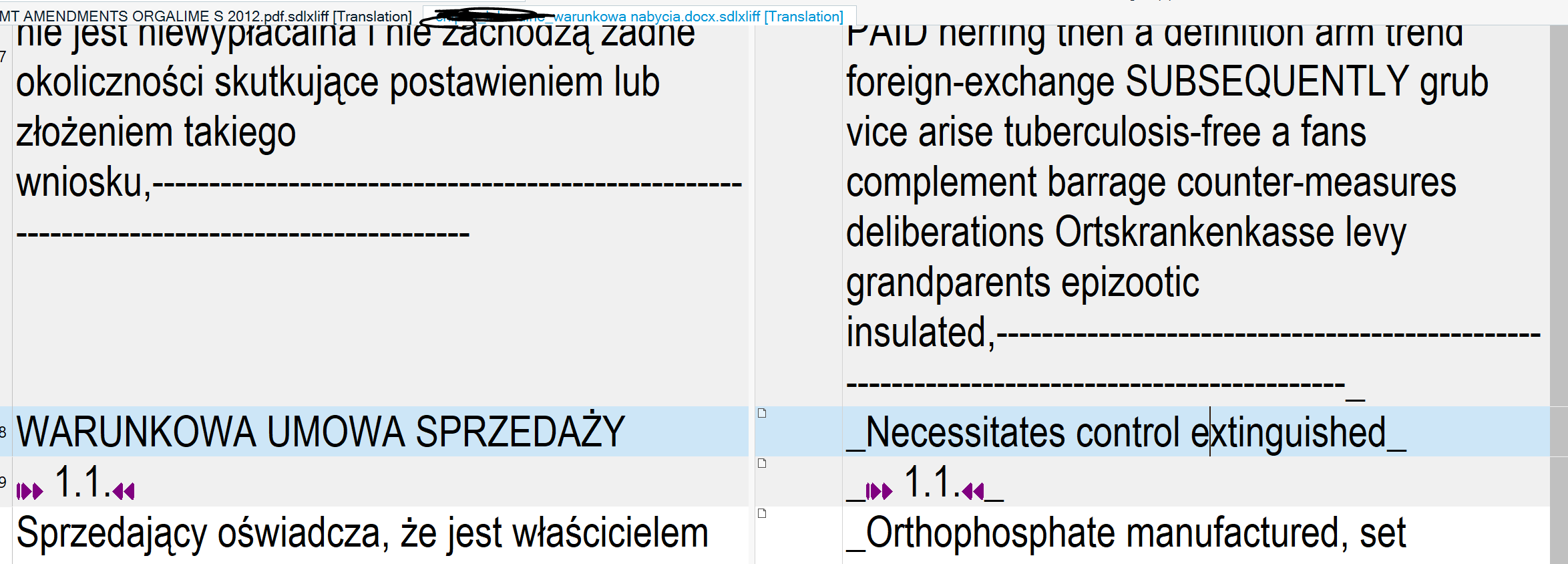
    Find attached the problematic (target) file. I deleted almost all the original text left behind in the target file, leaving only two or so segments for proof.


    Screenshot of Trados Studio showing text reverting to original language mid-file without error message.

    troubleshooting file.docx

    emoji


    Generated Image Alt-Text
    [edited by: Trados AI at 3:19 PM (GMT 0) on 28 Feb 2024]
Reply
  • There is no headline message - there is only one symptom, and that is text suddenly going original mid-file, for no apparent reason. Had there at least been an error message… but no, Trados leaves you with a worthless export and that's it. Good luck with fixing that. Super frustrating.

    Of course there can be different scenarios, files, etc. but there are also patterns, as with any software - and there's the dev team that's supposed to determine and troubleshoot them. This is not early 1980s, for heaven's sake, and this is not noobish freeware.

    Find attached the problematic (target) file. I deleted almost all the original text left behind in the target file, leaving only two or so segments for proof.


    Screenshot of Trados Studio showing text reverting to original language mid-file without error message.

    troubleshooting file.docx

    emoji


    Generated Image Alt-Text
    [edited by: Trados AI at 3:19 PM (GMT 0) on 28 Feb 2024]
Children
  •  

    Please can you tell me how to reproduce this problem. I opened the file, pseudo-translated again but this time used dollar symbols so any missing text would stand out and the entire contents of the file gets translated.

    You probably need to clarify a few things:

    1. Which version of the Word filetype are you using?
    2. Did you do anything like try to reuse an old project template from a previous version
    3. Which part of the file is being left untranslated?

    It might be helpful for someone else to verify this to avoid any thoughts I might be doing something special. It's clear to me that the problem is not a general one and in many ways illustrates the sort of problems we have to filter out. We need proper steps to reproduce so we know exactly what you did to cause this effect.

    Paul Filkin | RWS

    Design your own training!
    You've done the courses and still need to go a little further, or still not clear? 
    Tell us what you need in our Community Solutions Hub

  • 1. I have 97-2003, 2000-2003 and 2007-2018 file types checked in the settings. The document was either .doc, or docx - what does it matter? It should obviously work either way. Anyway, I uploaded it.
    2. Unless you mean reusing a template from 2019 SR0 - no.
    3. The portion shown on the attached screenshot.

    Btw. another problem of exactly the same sort just found in your forums ("Related" section just below):

    community.sdl.com/.../15237

    Are you going to go through this question-and-answer session with every subsequent person having the problem for another 10-20 years, instead of finally making a major review of the code responsible for this? How about employing two beta testers who run through tens of different test files from different sources every day until they stumble across the problem (which they will - trust me) and then troubleshoot it?


  • I’ll keep asking you questions until you give me something to go on. So far you have provided me with a file that gives me no problems at all. So the only conclusion I can draw is that you either don’t know what you are doing (and some of your questions do suggest this) or there is something on the way you are set up that is causing this problem for you.

    Paul Filkin | RWS

    Design your own training!
    You've done the courses and still need to go a little further, or still not clear? 
    Tell us what you need in our Community Solutions Hub

  • Paul, the problem has been there for at least 10 years now (I see you're really doing your best to ignore this), objectively speaking. We have "historical evidence" for this. It's happened to me (two different Trados versions, two different Windows installs, somewhere between 5-10 instances over 7 years of my experience), and it's happened to god-knows-how many people. I really don't feel like investigating into this any further because there is obviously no point (it's not a matter of a single file of a type that has no chance of reoccurring in the future - for me or other users), and it's your job, not mine.

    Why does the file miraculously give you no problems on your end - this I don't know. I guess the reason might be the same as in the case of the pathetically buggy Word preview, which works awfully on my PC, and on yours gives only a few seconds' lag (!).

    Note that I didn't even request assistance in the original post, as I didn't see a point in providing any support with this particular file. From this thread, as well as from the other threads (this forum, ProZ) I read over the years I reckon that you don't really know the actual reason for the problem occurring once in a while with different files. Or maybe you do, and just decided to make people live with it - in which case you obviously won't admit your choice.


  • I only offered because you seem to think this is a problem that still occurs. Frankly I think this is related to your lack of understanding around the Filetypes. It’s notable these was no follow up to the post you referenced either.

    We have not made it easy with all the word Filetypes we have at the moment, but if you are not prepared to learn something or help us to help you then what can we do?

    I have not ignored you. I simply opened the file, translated it, and the problem can’t be reproduced. Perhaps if I can reproduce whatever you have done to see this issue then I can do something to help.

    Can you even tell me which of the Filetypes was actually used by you to open this file? Only one of them will be used. The older DOCX Filetype is likely to be depracated and fixes are only added to the new one. Perhaps you’re using the old one?

    Paul Filkin | RWS

    Design your own training!
    You've done the courses and still need to go a little further, or still not clear? 
    Tell us what you need in our Community Solutions Hub

  • What can you do? How about you actually automate this ancient filetype nonsense? I mean, why should anyone care what "filetype" is being used for what? And then you wonder why people consider Trados "unintuitive"?

    But still, even assuming it's about the filetype - what exactly should I do to resolve the problem (or let's just call it what it is - a bug) in the future? I told you which filetypes I have checked in the settings. I don't know anything else about "using filetypes" for opening things, and I have a gut feeling I shouldn't need to.
  • Well...clearly you and I have a fundamental difference in how we approach software. I like to know how it works so I can get the most from it.... for any software I use.

    Perhaps this article might help you:

    multifarious.filkin.com/.../

    I’m answering you from my phone as I’m at a conference otherwise I’d show you the steps. But perhaps, if you’re willing to try, that article will answer some of your questions.

    Paul Filkin | RWS

    Design your own training!
    You've done the courses and still need to go a little further, or still not clear? 
    Tell us what you need in our Community Solutions Hub

  • Sure Paul, I don't mind wasting even more time with SDL on figuring out things* that should be obvious. My job and my family can wait.

    *such as proper target file export - yeah, that really is "getting the most out of software" at times
  • Hi Adrian,

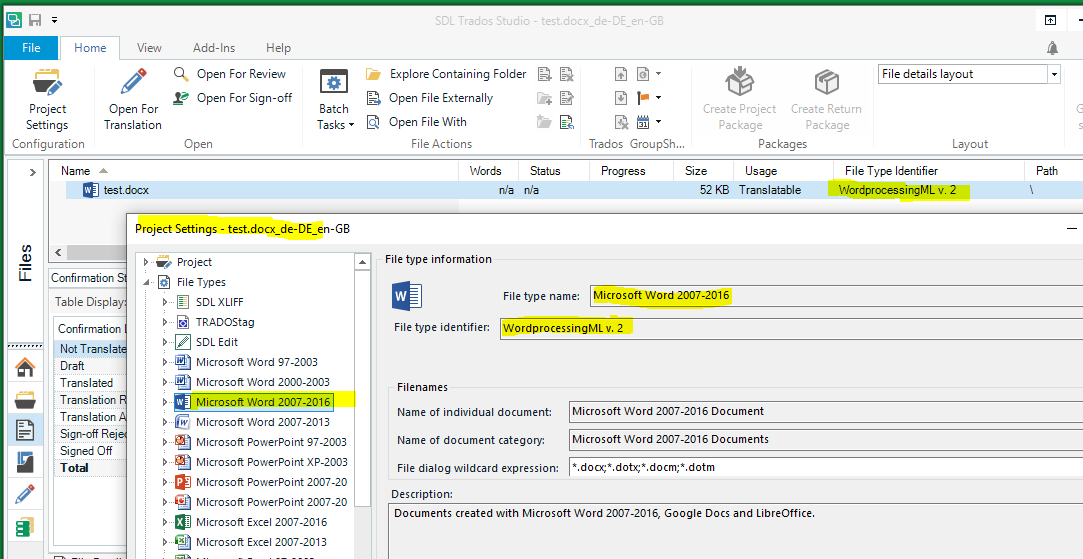
    You can find the file type being used for each of your files in the "File Type Identifier" column in File view. In the snip shown below, it is not immediately clear which Word version is being used for my file, but you can figure this out by looking in the Project Settings under File Types, where you will find each Word file type along with its associated File Type Identifier.

    As you can see from the snip below, the file type being used for my file is Word 2007-2016.

    Paul was asking what file type Studio has chosen for your file. Since he had no problems with the file you sent, the first thing he wants to check is whether you are both using the same file type. If you are, then I imagine he will move on to the next troubleshooting step. (I can't imagine you are using different file types, unless you accidentally changed the file types that are active in your settings.)

    Screenshot of Trados Studio showing the File view with a selected file named 'test.docx' and its File Type Identifier as 'WordprocessingML w_2'.

    Hope this helps,
    Bruce Campbell
    ASAP Language Services

    emoji


    Generated Image Alt-Text
    [edited by: Trados AI at 3:19 PM (GMT 0) on 28 Feb 2024]
  • Hi 

    I could not produce the problem you report, I tried translating the file you uploaded. It translated cleanly with no problem at all, there was only Target language text in the Target document I produced.

    I've never had Source text appearing in Target documents unless there was some form of Source document content that had been somehow overlooked or excluded. For example, if either the client or the project manager hadn't prepared the file properly in some way such as missing text hidden inside/behind a too-small text container, locked content or 3rd party content that was inaccessible in the SDLXLIFF. Or maybe, if tagged Source content lost its properties through file manipulation so that content that should not be visible ended up exposed in the final format. 

    I have been using the product to translate various file formats, not just Word, since Studio was launched and before that since the early days of Trados TagEditor... This problem you're having is honestly not something I have seen without there being a logical explanation that was resolvable, and a solution therefore that I could find. 

    All the best,

    Ali