QA Check to check for 'Different target in translation memory'

I want to check whether there are discrepancies between my translated xliff file and the TM. Is this possible in bulk?

I found two related features that almost do what I want:

  • If I browse through my file segment by segment, I get a message 'Different target in translation memory' in my translation results pane. This is great, but I want a full list.
  • If I run the QA check (Inconsistencies> Check for inconsistent translations), I see errors if a source string occurs multiple times, but has different translations. This is great, but it does not check vs. the TM.

Ideally, I want the QA check (Inconsistencies> Check for inconsistent translations) to check vs. the TM. It could be an option (a third checkbox) that says something like "ignore TM".

Does anybody know any workaround?

Parents
  • Hi Ken,

    Ken De Wachter said:
    Does anybody know any workaround?

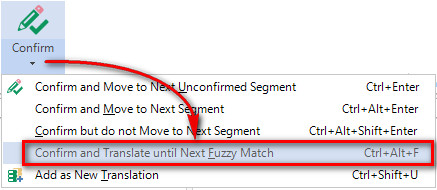
    I guess your best option, as there is no QA report for this as Jesse mentioned, is to use the "Translate to fuzzy" feature.  So open all your files, start at the top and then run this command:

    This will stop at every segment where the TM differs to what's in your translation.  So no QA, but at least you don't have to do a manual work segment by segment.

    Regards

    Paul

    Paul Filkin | RWS

    Design your own training!
    You've done the courses and still need to go a little further, or still not clear? 
    Tell us what you need in our Community Solutions Hub

Reply
  • Hi Ken,

    Ken De Wachter said:
    Does anybody know any workaround?

    I guess your best option, as there is no QA report for this as Jesse mentioned, is to use the "Translate to fuzzy" feature.  So open all your files, start at the top and then run this command:

    This will stop at every segment where the TM differs to what's in your translation.  So no QA, but at least you don't have to do a manual work segment by segment.

    Regards

    Paul

    Paul Filkin | RWS

    Design your own training!
    You've done the courses and still need to go a little further, or still not clear? 
    Tell us what you need in our Community Solutions Hub

Children