You are currently working on UAT 

Error message: "An error has occurred whilst using the translation provider [TM]: The formatter threw an exception while trying to deserialize the message: "

Hello,

I am experiencing some troubles with a project carried on under Studio 2011  - which I have been using for four years now, without having this kind of issue. In my current project, when I make a concordance search, every other time I get an error message: "An error has occurred whilst using the translation provider [TM]: The formatter threw an exception while trying to deserialize the message: " and so on.... It is a very long error message, but unfortunately I cannot copy-paste it (frequent problem with Studio, so inconvenient!). The TM is located on a client's server, whose support team reviewed the issue without finding anything wrong. The strangest part is that sometimes I can benefit from the fuzzy match/concordance search features, but sometimes I can't, in the same file. I found out that the problem is linked to specific words/phrases/segments. No matter how many times I translate them, I never find them back in the TM.

Any idea? Many thanks in advance!

Parents
  • Hi Alice,

    This could be quite a tricky one to resolve without working hand in hand with your client. Since it's a Server TM the problem could be related to the version of their server solution for example. Studio 2011 is quite old now, in fact it will no longer be supported from the end of this year.

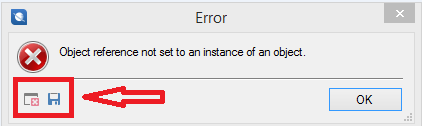
    When you see an eror message like this there should be a couple of little icons on the bottom left. One of these is a disk icon which you can click and it saves the entire message stack as an xml file so you can send it someone for investigation. The other icon allows you to read the entire message and it can be copied and patsed from (but please don't post the entire thing into here!). If you can get the xml file perhaps you can add it as an attachment to this post by using the rich formating option when you reply... or put it on dropbox perhaps and just provide the link?

    Regards

    Paul

    Paul Filkin | RWS

    Design your own training!
    You've done the courses and still need to go a little further, or still not clear? 
    Tell us what you need in our Community Solutions Hub

Reply
  • Hi Alice,

    This could be quite a tricky one to resolve without working hand in hand with your client. Since it's a Server TM the problem could be related to the version of their server solution for example. Studio 2011 is quite old now, in fact it will no longer be supported from the end of this year.

    When you see an eror message like this there should be a couple of little icons on the bottom left. One of these is a disk icon which you can click and it saves the entire message stack as an xml file so you can send it someone for investigation. The other icon allows you to read the entire message and it can be copied and patsed from (but please don't post the entire thing into here!). If you can get the xml file perhaps you can add it as an attachment to this post by using the rich formating option when you reply... or put it on dropbox perhaps and just provide the link?

    Regards

    Paul

    Paul Filkin | RWS

    Design your own training!
    You've done the courses and still need to go a little further, or still not clear? 
    Tell us what you need in our Community Solutions Hub

Children