You are currently working on UAT 

Analyze File Report does not read context matches that appear in the Xliff

Hello,

I have an Xliff from a client that is full of context matches. 

When I check the Analyze File Report it states that there are 0 context matches.

The client however is able to see the context matches in their report - note that they sent me a package, I only opened this and checked the report straight away. 

Can you help figure out why this is happening? 

I have checked in both Studio 2015 and 2019 and I get the same result.

Thank you in advance!

Katie

Parents Reply
  • So you´re saying that there is an option when creating a package where you can allow Studio to not recalculate the analysis? Is it an option or is it more likely that they didn´t select the option which would tell Studio to recalculate?

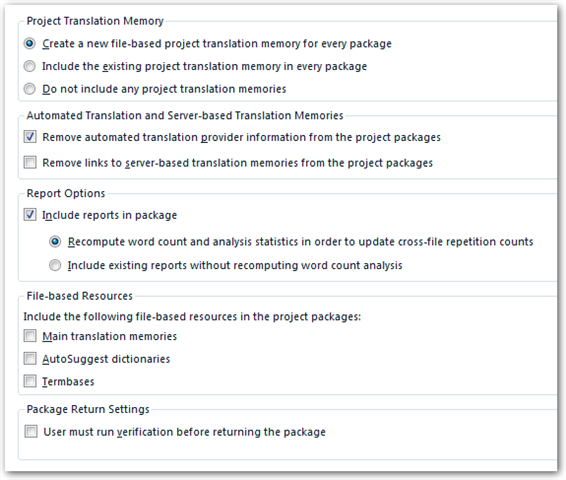
    These are the defaults when creating a project package:
    Screenshot of Trados Studio project package creation settings showing options for Project Translation Memory, Automated Translation, Report Options, File-based Resources, and Package Return Settings.

    This also means that  when I open the package and convert it to a project, the Analyze File Report that is included in the project is not created in that moment?

    No, it's not created. It's extracted from the package. It has always worked like this.

    I have now tried to run a new Batch tasks > Analyze file, and I get the below error - is it related?

    No, it's not.
    It rather suggests that something is really wrong with your Studio installation.
    You should try to repair your installation, or reinstall Studio.

    emoji


    Generated Image Alt-Text
    [edited by: Trados AI at 6:27 PM (GMT 0) on 28 Feb 2024]
Children