You are currently working on UAT 

Analyze File Report does not read context matches that appear in the Xliff

Hello,

I have an Xliff from a client that is full of context matches. 

When I check the Analyze File Report it states that there are 0 context matches.

The client however is able to see the context matches in their report - note that they sent me a package, I only opened this and checked the report straight away. 

Can you help figure out why this is happening? 

I have checked in both Studio 2015 and 2019 and I get the same result.

Thank you in advance!

Katie

Parents Reply
  • Thanks, Evzen. 

    Sounds like this could be the reason for the discrepancy alright.

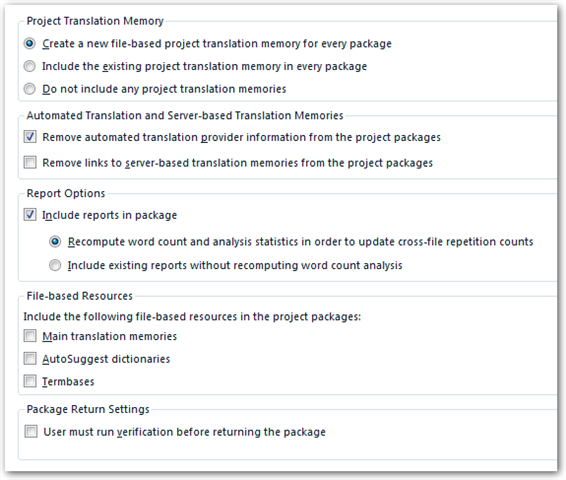
    So you´re saying that there is an option when creating a package where you can allow Studio to not recalculate the analysis? Is it an option or is it more likely that they didn´t select the option which would tell Studio to recalculate?

    This also means that  when I open the package and convert it to a project, the Analyze File Report that is included in the project is not created in that moment? It´s an old file. 

    I have now tried to run a new Batch tasks > Analyze file, and I get the below error - is it related?

    It would be good to know so that I can help explain this to the client so they know what they should be doing. 

    Thanks again, 

    Katie

Children