You are currently working on UAT 

Merged segments not showing merged text

I have had to merge segments – and now find that while everything looks good in the source and target in Trados, when I hit preview [source or target] the rest of the sentence – except the first line, or the orgignal first segment – has disappeared: any ideas how to fix this?

[IE] 3 merged segemnts, for example, forming one full sentence in both source and target in Trados, only display the first line [presumably the initial segment] for both source and target in both html and embedded preview.

Parents
  • Former Member
    0 Former Member

    ah.. found it

    It is not related with the Merge

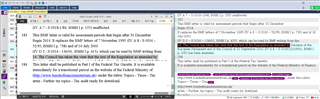
    It is the problem of "some kind of MS Word vertical arrangement", I guess..

    Screenshot of Trados Studio showing a document with vertical text alignment issue in MS Word, causing display problems in the translation software.

    emoji


    Generated Image Alt-Text
    [edited by: Trados AI at 6:09 PM (GMT 0) on 28 Feb 2024]
  • Former Member
    0 Former Member in reply to Former Member

    It is a TABLE, the height of CELL has restriced with unknown reason.

    Just let it go, then you will be happy again

    Bye..

  • Former Member
    0 Former Member in reply to John Kingsmore

    easy, my friend

    you are quite right

    "Machines are idiot" including the most advanced DeepLearning and AbyssLearning WhatSoEver...

    It needs smart people's touch, just like you.

    And never mind biased opinions, just ignore it.

    Regards

  • Former Member
    0 Former Member in reply to Former Member

    it is hard to say as a BUG, but it is very clear that something should be done form SDL side not from user side. 

  • Thanks for the "sample" file.  I created the sort of file I was looking for from your file by saving the source, editing the source and then using that.  File attached so you can see what I was getting at:

    small_test.docx

    The conclusions I can draw from this are these:

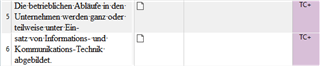
    1. The docx is really poorly prepared so I 100% agree with Evzen here.  You for example see that these two rows are on completely different table rows... separate paragraphs:

      Screenshot of Trados Studio showing two separate table rows with text not aligned properly.

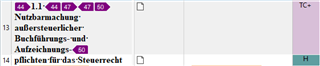
      And here, the second part of the sentence is a header and also part of a separate table row and different paragraph:

      Screenshot of Trados Studio with a header incorrectly formatted as part of a table row.

    2. Studio should still be able to handle the preview in my opinion.

    You can sort of see what's happening since a merge with the initial preview shows the highlighted segment of the first one even after the merge took place and it doesn't pick up the fact that there is more text there.  So the link between the original source file where this is a completely separate table row is still there and the preview associates the merged text with the second row in the table and not this segment.  As soon as you refresh the preview it won't see this additional text at all:

    Screenshot of Trados Studio preview highlighting a segment that fails to merge with additional text.

    So yes, the document that has been presented is a terrible (or really good) example of a file given to anyone to localize when they are using a CAT tool that really does care about formatting to the extent Studio does.  But sometimes I think Studio needs a "lenient mode" where it's a little more forgiving to make the translation process easier for the translators since we will never change the ability of our clients, or many translators (by this I mean technical ability AND the time they have available to turn the translation around), to be able to fix a document like before translating.  Might be worth looking at the tools being used for the PDF conversion though as there may be much better ones available that don't put things into lots of tables like this.  I think I've seen some free online PDF converters do things like this and in these cases it would be simply better to hand the PDF to the translator since most CAT tools can do a better job handled the right way.

    It's also another very good example of why we never supported merge across paragraphs before as it can present some challenges because of the way Studio handles paragraphs to provide additional information to the user that most CAT tools don't.

    I'll log this example as a bug and let you know when I have some comment on this from the deveopment team.

    Paul Filkin | RWS

    Design your own training!
    You've done the courses and still need to go a little further, or still not clear? 
    Tell us what you need in our Community Solutions Hub

    emoji


    Generated Image Alt-Text
    [edited by: Trados AI at 6:09 PM (GMT 0) on 28 Feb 2024]
  • This is entirely a Studio problem, since

    1. a) the original source xliff/project was made by Studio and
    2. b) the target file, also produced by Studio, is also coming out wrong when segments are merged.

    Sorry man, but this clearly indicates that you have no idea about the technicalities behind the whole story and therefore make totally wrong conclusions.

    First of all, if you would mention right at the beginning that the source was a PDF, the entire discussion would have been MUCH shorter!

    It's notoriously known that PDF as a source is evil and very bad idea.
    PDF was ALWAYS meant ONLY FOR VISUAL CONSUMPTION and NEVER meant for editing... therefore it lacks some information needed for editing... therefore the applications attempting to edit PDFs have to GUESS these information since they have no way to know the original intentions of the creator of the actual source format from which the PDF was created... and therefore the result is way too often just as sh*tty as in your case.

    It's also notoriously known that Studio uses 3rd party automatic PDF-to-DOCX conversion behind the scenes.
    Since it's automatic, the above paragraph applies...
    And since it's 3rd party, Studio has no way to influence the result... hence it's NOT Studio problem.

    Second, it's also notoriously known and mentioned everywhere that the intermediate DOCX file coming from the automated conversion should be manually edited and cleaned from the sh*t before stuffing it to any localization software (i.e. not only Studio!!!).
    So yes, it's indeed about lack of user knowledge (either knowledge about the required cleaning, or the knowledge WHAT and HOW to clean)....

    And third, the entire problem has nothing to do with merging segments in fact, the same issue - caused by the sh*tty Word source! - can be seen without merging as well.
    The preview DOES contain the entire text, indeed... it's just not/hardly visible due to the fixed table row height.
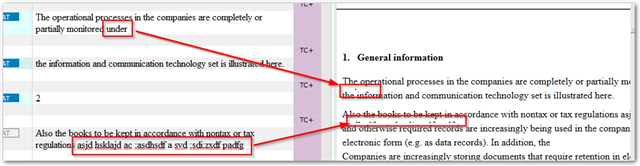
    The following screenshot shows the hard-to-see artifacts of the remaining text without any merging, just previewing the SDLXLIFF you posted.

    Screenshot of Trados Studio showing a segment with overlapping text, making it hard to read, and a red box highlighting the issue.

    emoji


    Generated Image Alt-Text
    [edited by: Trados AI at 6:09 PM (GMT 0) on 28 Feb 2024]
  • This is entirely a Studio problem, since

    1. a) the original source xliff/project was made by Studio and
    2. b) the target file, also produced by Studio, is also coming out wrong when segments are merged.

    Sorry man, but this clearly indicates that you have no idea about the technicalities behind the whole story and therefore make totally wrong conclusions.

    I don't disagree with you that the source is poor, but in general I agree with John and I think we should be able to handle this better.  I don't think it is the job of translators to understand the technicalities in the same a way a seasoned localization engineer would.  If Studio was sold as a tool designed only for these specialists I think you might have a point, but it's not.  So I personally think we should fix this.

    Paul Filkin | RWS

    Design your own training!
    You've done the courses and still need to go a little further, or still not clear? 
    Tell us what you need in our Community Solutions Hub

  • I beg to disagree a bit. The translators must know, how the tool works and they MUST know, what happens with a PDF file, when it is simply thrown on Studio without taking care about the post processing. The life has changed and we live in 21st century. But TBH the "translators not understanding technicalities" was never valid. Even as we translated from paper, you had to know how formatting in Word works. Now things got more complicated and we have to deal with many more formats than just plain paper. Understanding how your tool works is a necessary prerequisite to deliver high quality translation. Otherwise you deliver crap - even if the translation as such is lingusticaly OK.

    There is no excuse for translator not to know the tool used. Exactly as there is no excuse to a nurse not knowing how to enter the data of the patient in her computer. If other processions can learn using computer to their need, I do not see why should translators be excused here.

    _________________________________________________________

    When asking for help here, please be as accurate as possible. Please always remember to give the exact version of product used and all possible error messages received. The better you describe your problem, the better help you will get.

    Want to learn more about Trados Studio? Visit the Community Hub. Have a good idea to make Trados Studio better? Publish it here.

  • I beg to disagree a bit. The translators must know, how the tool works and they MUST know, what happens with a PDF file, when it is simply thrown on Studio without taking care about the post processing.

    Well, this is an interesting twist ;-)  Translators telling us we don't need to fix something!!

    It is certainly a good idea for everyone to learn as much as they can about their software, but that doesn't excuse the software from being able to make this easier and reduce the effort required to mirror the source files provided.  Just because the source files are a poor conversion does not excuse the software from being able to handle them.  We can extract the text ok, so it seems logical that we should be able to preview it and save the target too.

    Let's keep this to a discussion on this specific problem... I doubt we disagree about the rest.

    Paul Filkin | RWS

    Design your own training!
    You've done the courses and still need to go a little further, or still not clear? 
    Tell us what you need in our Community Solutions Hub

  • IMO, SDL made a kind of mistake when they implemented this "easy for translator" process for translating PDFs.
    Something what perhaps originally looked like a competitive advantage turned very quickly to a pain-in-the-ass...

    If I would be a product manager, I would seriously think about removing this feature....

  • Translators telling us we don't need to fix something!!

    But well, there is really nothing to fix... everything works just fine, as I just showed...

    it seems logical that we should be able to preview it and save the target too

    But you DO show it in preview and you DO save it in the target too...
    It's all about just the bad formatting of the source and the VISUAL(!!!) result...

  • If I would be a product manager, I would seriously think about removing this feature....

    I doubt this would happen as there is a healthy volume of these type of files coming through the software and prior to this capability it was always one of the most requested features.  I think a text only extract might be a good idea so we strip out all formatting and leave it to the user to reformat in Word to get the look and feel prior to translation... if they have the time to do it.

    Paul Filkin | RWS

    Design your own training!
    You've done the courses and still need to go a little further, or still not clear? 
    Tell us what you need in our Community Solutions Hub

Reply Children
  • If you strip all formatting from the PDF after the conversion, the vast majority of the users producing the target file will not even be able to format it... And here is the whole problem: people cannot use the software they are expected to use.

    _________________________________________________________

    When asking for help here, please be as accurate as possible. Please always remember to give the exact version of product used and all possible error messages received. The better you describe your problem, the better help you will get.

    Want to learn more about Trados Studio? Visit the Community Hub. Have a good idea to make Trados Studio better? Publish it here.

  • it was always one of the most requested features

    Sure... from people which don't have the faintest idea about why it's 'not possible'... from people who don't understand that PDF is NOT just another document format... from people who hardly have an idea about the technicalities behind.

    I believe that "one of the most requested features" from, let's say, often traveling salesmen is a teleport ;-)... but still no transportation company does not do any research or implementation in this regard...
    ...simply because someone sensibly evaluated the request and found it unreal or not worth the trouble...

  • Sure... from people which don't have the faintest idea about why it's 'not possible'... from people who don't understand that PDF is NOT just another document format... from people who hardly have an idea about the technicalities behind.

    I believe that "one of the most requested features" from, let's say, often traveling salesmen is a teleport ;-)... but still no transportation company does not do any research or implementation in this regard...
    ...simply because someone sensibly evaluated the request and found it unreal or not worth the trouble...

    You did make me laugh... but hardly the same thing.  At the end of the day people receive PDF files for translation and they just want a better way of handling them.  A perfectly reasonable request given the source of their income is coming from people who definitely don't have a clue.

    Paul Filkin | RWS

    Design your own training!
    You've done the courses and still need to go a little further, or still not clear? 
    Tell us what you need in our Community Solutions Hub

  • Yeah, the example was a bit extreme ;-)

    I just disagree here...nonsensical requests are still nonsensical, no matter if they are made by people paying me.

    "A better way of handling PDF" was known for ages - get the source format from which the PDF was created. Period.
    And only if there is really really REALLY REALLY no chance to get the source, use the convert-to-word workaround, clearly understanding that it's just an emergency workaround with lot of drawbacks, not an easy-peasy day-to-day process.

    That should be the message from big localization players towards the clients... because they don't believe poor translators, they believe only to big companies.

    If the poor translators had their backs covered by such clear statements from big players, they would be able to argument with the ignorant clients... and won't be pushed to corner by "translate this PDF, or I'm going to ask someone else" requests.

    EDIT::
    Actually, getting back to the teleport example - I'm pretty sure that the salesmen most probably even DON'T request the teleport, simply because it's widely and publicly known that it's not possible.