You are currently working on UAT 

Merged segments not showing merged text

I have had to merge segments – and now find that while everything looks good in the source and target in Trados, when I hit preview [source or target] the rest of the sentence – except the first line, or the orgignal first segment – has disappeared: any ideas how to fix this?

[IE] 3 merged segemnts, for example, forming one full sentence in both source and target in Trados, only display the first line [presumably the initial segment] for both source and target in both html and embedded preview.

Parents Reply
  • Thanks for the "sample" file.  I created the sort of file I was looking for from your file by saving the source, editing the source and then using that.  File attached so you can see what I was getting at:

    small_test.docx

    The conclusions I can draw from this are these:

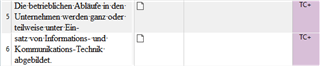
    1. The docx is really poorly prepared so I 100% agree with Evzen here.  You for example see that these two rows are on completely different table rows... separate paragraphs:

      Screenshot of Trados Studio showing two separate table rows with text not aligned properly.

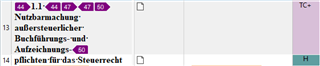
      And here, the second part of the sentence is a header and also part of a separate table row and different paragraph:

      Screenshot of Trados Studio with a header incorrectly formatted as part of a table row.

    2. Studio should still be able to handle the preview in my opinion.

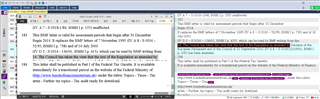
    You can sort of see what's happening since a merge with the initial preview shows the highlighted segment of the first one even after the merge took place and it doesn't pick up the fact that there is more text there.  So the link between the original source file where this is a completely separate table row is still there and the preview associates the merged text with the second row in the table and not this segment.  As soon as you refresh the preview it won't see this additional text at all:

    Screenshot of Trados Studio preview highlighting a segment that fails to merge with additional text.

    So yes, the document that has been presented is a terrible (or really good) example of a file given to anyone to localize when they are using a CAT tool that really does care about formatting to the extent Studio does.  But sometimes I think Studio needs a "lenient mode" where it's a little more forgiving to make the translation process easier for the translators since we will never change the ability of our clients, or many translators (by this I mean technical ability AND the time they have available to turn the translation around), to be able to fix a document like before translating.  Might be worth looking at the tools being used for the PDF conversion though as there may be much better ones available that don't put things into lots of tables like this.  I think I've seen some free online PDF converters do things like this and in these cases it would be simply better to hand the PDF to the translator since most CAT tools can do a better job handled the right way.

    It's also another very good example of why we never supported merge across paragraphs before as it can present some challenges because of the way Studio handles paragraphs to provide additional information to the user that most CAT tools don't.

    I'll log this example as a bug and let you know when I have some comment on this from the deveopment team.

    Paul Filkin | RWS

    Design your own training!
    You've done the courses and still need to go a little further, or still not clear? 
    Tell us what you need in our Community Solutions Hub

    emoji


    Generated Image Alt-Text
    [edited by: Trados AI at 6:09 PM (GMT 0) on 28 Feb 2024]
Children