You are currently working on UAT 

TM’s do not provide matches when added to a translation project

Hello,

I have the following problem: neither full nor fuzzy matches crop up, Trados Studio 2019 simply does not populate existing matches from TMs into a new translation, the fields are all left blank even if there are 100% matches and I've spent two hours scouring the "community" here and the internet for a solution - nothing works.

Please note that I have made sure the following two points:

o   In “Project Settings \ Language Pairs \ All Language Pairs \ Translation Memory and Automated Translation” your TM is added and it is “Enabled”

o   M yproper TM is added to the project; I am aware there are users who have more than one TM with the same name (one empty and one that actually has content) and the empty one is used

Can anyone help?

Best,
Christoph

  • Hello

    Could you please give us a bit more details?

    - Do you mean that when you pre-translate the file, no segment will be populated? Do you receive any warning messages?

    - And/or when you are in Editor, and click into a segment, no matches will appear in the TM matches window?

    Could you please check your analysis results and confirm that indeed there is leverage, matches in your TM that you can use here?


    Looking forward to hearing back from you.

    Best wishes,
    Greta

  • Hello Greta,

    Many thanks for your response.
    I meant that no matches appear in the TM matches window.

    To give you a little more background : my client has made slight changes to a big document and I don't want to compare the two "Word" files but adapt the changes in TRADOS, which would be much less work if the TM matching in Studio 2019 worked as it should - and as Studio 2014 did (which I used until the end of December 2018).
    Obviously, there is a snag here, and I just don't know how to fix it. The first TM is there, it's almost identical, but the matches do simply not crop up. All very annoying. Please let me know if you require further information to help.
    PS: What do you mean by checking my analysis results?  I don't know how to do this.


    Best,
    Christoph
  • Hello

    Thank you for these details.

    Have you created a project or opened the file directly for translation?
    - If the latter, please save the file in the Editor, and run the batch task 'Analyze Files'. This will help you see the leverage, what kind of matches do you have in your TM to use in this translation. The reason you are not seeing matches in the TM matches window could simple be the fact that there are no matches to use. Maybe the segmentation was different, maybe the changes were too extensive.

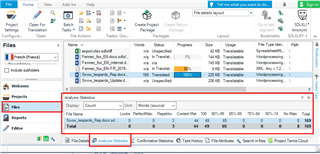
    - If you have created a project, then Studio already analysed the file for you. In that case no need to run the batch task, just go the the 'Analysis Statistics' window in Files view to see the analysis, the distribution of matches coming from your TM:

    Trados Studio screenshot showing the Analysis Statistics window with counts for Total, Repetitions, 100% Matches, and Fuzzy Matches highlighted.

    In case you can see matches, high fuzzies and 100% matches in the analysis:
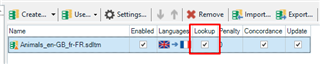
    - go to Project Settings \ Language Pairs \ All Language Pairs \ Translation Memory and Automated Translation and check if the TM is ticked for 'Lookup':

    Trados Studio screenshot highlighting the unchecked 'Lookup' option in the Translation Memory settings.

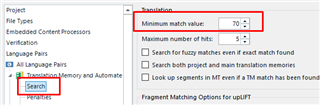
    - and go to Search under this and check the minimum match value of matches to be suggested in the window - if it's too high, it could be the reason they don't appear:
    Trados Studio screenshot showing the Search settings with the 'Minimum match value' field set to 70% highlighted.

    In case the analysis results don't show any usable matches, then first it would be best if you could align the previously translated version of this document with its source, so you can upload it into the memory and reuse it.

    Let me know please your findings, and if anything is unclear.

    Best wishes,
    Greta

    emoji


    Generated Image Alt-Text
    [edited by: Trados AI at 5:22 PM (GMT 0) on 28 Feb 2024]
  • Hello Greta Magyar,

    Many thanks for your elaborate response. I have opened the file directly for translation (thus, no project).

    What I get when I run "analysis" in "Batch Tasks" is an error message: "Error in XML document 1,76", which I don't understand as I only use Word files. So there are no results as to fuzzy machtes. 

    By the way, the two documents are almost identical, there can be no question of one too extensive changes.

    By the way, I get the same error message when I try to align the two xliff-files in "Create New Project" - maybe the files are just too big (lots of illustrations in them, overall size : 177.141 KB)?

    Let me know if you still think you can help.

    Best,

    Christoph

  • Hello Christoph,

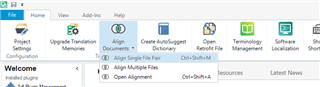
    For the alignment I meant aligning the previous Word source file and its translation also in Word, by aligning them as single file pair, after clicking on 'Align Documents' in the Welcome view:
    Trados Studio Welcome view showing 'Align Documents' option with submenu options 'Align Single File Pair' and 'Open Alignment'.

    Do you have the corresponding Word files?

    As for the error message, it seems something is wrong with the file. I understand you have not started the translation, and have not saved the file, so you are in the very beginning of the process, is that correct?

    Could you please try running the batch task again and send me the error details?
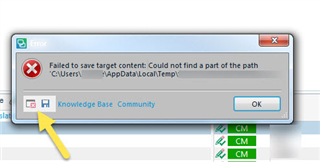
    Error message in Trados Studio stating 'Failed to save target content: Could not find a part of the path C:UsersUsernameAppDataLocalTemp'.
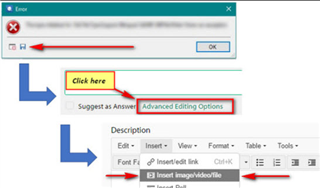
    Screenshot highlighting the 'Advanced Editing Options' link in a forum post editor with error message dialog box in the background.

    And also, if possible, could you send me the Word file you have to translate so I can test it? I will treat it confidentially. My email address is gmagyar@sdl.com

    Thank you,
    Greta

    emoji


    Generated Image Alt-Text
    [edited by: Trados AI at 5:21 PM (GMT 0) on 28 Feb 2024]
  • Hello Christoph,

    Thank you for the files.
    As described in my email I think the reason for not receiving any matches from the TM is that it has not been updated yet with the content from the previous translation. Once I uploaded the sdlxliff of the previous translation and analysed the new file with it there were a lot of matches, and only a handful of new words to translate from scratch.

    Hope I could help. Please confirm.

    Best wishes,
    Greta