You are currently working on UAT 

TM’s do not provide matches when added to a translation project

Hello,

I have the following problem: neither full nor fuzzy matches crop up, Trados Studio 2019 simply does not populate existing matches from TMs into a new translation, the fields are all left blank even if there are 100% matches and I've spent two hours scouring the "community" here and the internet for a solution - nothing works.

Please note that I have made sure the following two points:

o   In “Project Settings \ Language Pairs \ All Language Pairs \ Translation Memory and Automated Translation” your TM is added and it is “Enabled”

o   M yproper TM is added to the project; I am aware there are users who have more than one TM with the same name (one empty and one that actually has content) and the empty one is used

Can anyone help?

Best,
Christoph

Parents
  • Hello

    Could you please give us a bit more details?

    - Do you mean that when you pre-translate the file, no segment will be populated? Do you receive any warning messages?

    - And/or when you are in Editor, and click into a segment, no matches will appear in the TM matches window?

    Could you please check your analysis results and confirm that indeed there is leverage, matches in your TM that you can use here?


    Looking forward to hearing back from you.

    Best wishes,
    Greta

  • Hello Greta Magyar,

    Many thanks for your elaborate response. I have opened the file directly for translation (thus, no project).

    What I get when I run "analysis" in "Batch Tasks" is an error message: "Error in XML document 1,76", which I don't understand as I only use Word files. So there are no results as to fuzzy machtes. 

    By the way, the two documents are almost identical, there can be no question of one too extensive changes.

    By the way, I get the same error message when I try to align the two xliff-files in "Create New Project" - maybe the files are just too big (lots of illustrations in them, overall size : 177.141 KB)?

    Let me know if you still think you can help.

    Best,

    Christoph

  • Hello Christoph,

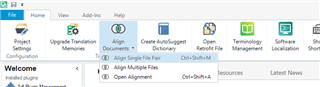
    For the alignment I meant aligning the previous Word source file and its translation also in Word, by aligning them as single file pair, after clicking on 'Align Documents' in the Welcome view:
    Trados Studio Welcome view showing 'Align Documents' option with submenu options 'Align Single File Pair' and 'Open Alignment'.

    Do you have the corresponding Word files?

    As for the error message, it seems something is wrong with the file. I understand you have not started the translation, and have not saved the file, so you are in the very beginning of the process, is that correct?

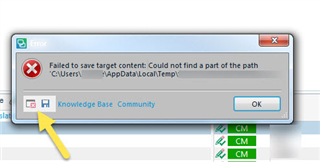
    Could you please try running the batch task again and send me the error details?
    Error message in Trados Studio stating 'Failed to save target content: Could not find a part of the path C:UsersUsernameAppDataLocalTemp'.
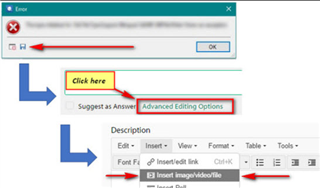
    Screenshot highlighting the 'Advanced Editing Options' link in a forum post editor with error message dialog box in the background.

    And also, if possible, could you send me the Word file you have to translate so I can test it? I will treat it confidentially. My email address is gmagyar@sdl.com

    Thank you,
    Greta

    emoji


    Generated Image Alt-Text
    [edited by: Trados AI at 5:21 PM (GMT 0) on 28 Feb 2024]
Reply
  • Hello Christoph,

    For the alignment I meant aligning the previous Word source file and its translation also in Word, by aligning them as single file pair, after clicking on 'Align Documents' in the Welcome view:
    Trados Studio Welcome view showing 'Align Documents' option with submenu options 'Align Single File Pair' and 'Open Alignment'.

    Do you have the corresponding Word files?

    As for the error message, it seems something is wrong with the file. I understand you have not started the translation, and have not saved the file, so you are in the very beginning of the process, is that correct?

    Could you please try running the batch task again and send me the error details?
    Error message in Trados Studio stating 'Failed to save target content: Could not find a part of the path C:UsersUsernameAppDataLocalTemp'.
    Screenshot highlighting the 'Advanced Editing Options' link in a forum post editor with error message dialog box in the background.

    And also, if possible, could you send me the Word file you have to translate so I can test it? I will treat it confidentially. My email address is gmagyar@sdl.com

    Thank you,
    Greta

    emoji


    Generated Image Alt-Text
    [edited by: Trados AI at 5:21 PM (GMT 0) on 28 Feb 2024]
Children