

You are currently working on UAT 

Sentences not recognised

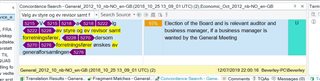
Screenshot of Trados Studio concordance search results showing repeated sentences with hidden tags highlighted in yellow and purple.

Studio 2017 SR1 Build 14.1.6413.8, Windows 10.

I am working on a Word file that has been converted from a pdf.

Repeat sentences are not being recognised. When I use the concordance I get the above - there appear to be hidden tags.

What are they, and is it possible to eliminate them? I very frequently work on converted files, but this is a new experience.


Generated Image Alt-Text
[edited by: Trados AI at 5:19 PM (GMT 0) on 28 Feb 2024]

emoji
Parents Reply
  • Hi , hi ,

    I had missed that it was a Word file already, I thought it was Studio that had converted a PDF and thus suggested creating a source Word file.

    Sometimes when software converts a PDF, its text is read as not quite the same font size throughout, so the software automatically adds tags to match the changes between size or even font. Thus if you tidy the Word file of unnecessary tags, it will be much easier.

    Years ago when working with Interleaf Quicksilver, I used to tidy the font tags up before converting for translation, using a similar Find & Replace method to that I described. I then found it could be done in Word too.

    I'd never checked to see if there was now an app to do it though it is logical that someone somewhere would have thought of it. I'm glad to find that there is, I will pass that info on to the agencies I work for, they'll be pleased!

    Thanks,

    Ali Slight smile

Children