

You are currently working on UAT 

Sentences not recognised

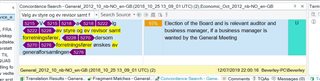
Screenshot of Trados Studio concordance search results showing repeated sentences with hidden tags highlighted in yellow and purple.

Studio 2017 SR1 Build 14.1.6413.8, Windows 10.

I am working on a Word file that has been converted from a pdf.

Repeat sentences are not being recognised. When I use the concordance I get the above - there appear to be hidden tags.

What are they, and is it possible to eliminate them? I very frequently work on converted files, but this is a new experience.


Generated Image Alt-Text
[edited by: Trados AI at 5:19 PM (GMT 0) on 28 Feb 2024]

emoji
Parents Reply
  • I think Ali may have missed that you are already working with a Word file converted from your PDF.  But she is correct that these are almost certainly formatting tags that you are just just displaying in the editor as you work.  If you press Ctrl+Shift+H then this will probably display the tags you are not seeing.

    What you should have done is clean up the conversion a little more thoroughly to remove all the unnecessary tags that are controlling things like kerning, colour variations, size variation... all as a result of the PDF conversion process.  Tools like TransTools can help a lot with this:

    https://appstore.sdl.com/language/app/transtools/543/

    Technically they don't matter and you should be able to ignore them in the target translation.  But they do make a mess of your TM as you'll be penalised if you ever compare to a cleaner text.

    Paul Filkin | RWS

    Design your own training!
    You've done the courses and still need to go a little further, or still not clear? 
    Tell us what you need in our Community Solutions Hub

Children