You are currently working on UAT 

Why such a big difference between volume reports, when analyzing documents with Trados 2019 and Trados 2014?

Hi,

We recently faced a disappointing conclusion, while analyzing documents with Trados 2019 and with Trados 2014:

There is a big difference in the number of characters/words that Trados 2019 shows in reports for the same documents we analyze with Trados 2014.

For example Trados 2019 shows around 27.000 characters while Trados 2014 shows 90.000 characters.

The document we analyzed is translatable and it is a powerpoint file with footnote notes in every slide.

And this situation is valid for any document we analyze with both versions.

Do you also receive such a difference?

The problem is that the truth is provided by Trados 2014. 

It is very unprofessional to use the latest version of Trados, provide a quote to a customer and then be asked by the translator what happenned, because the volume is much more, almost 4 times bigger...

looking forward to you comments and impressions.

Thanks,

Cristina

Parents
  • Can you provide a sample?  Maybe pseudo translate a couple of slides in Studio 2014 so you have an anonymized deck and then share the file?  It's very hard to answer these kind of questions other than to ask you to make sure you have all the same options checked in the filetype settings... which I'm sure you have done.

    Paul Filkin | RWS

    Design your own training!
    You've done the courses and still need to go a little further, or still not clear? 
    Tell us what you need in our Community Solutions Hub

  • Hello Paul,

    Thank you for your quick reply. And for the suggestion.

    As you suggested, I have pseudo translated in Trados 2014 a powerpoint presentation, and saved it both as ppt and as pptx. I analyzed both ppt and pptx with Trados 2019 and Trados 2014.

    The result was approx. the same no. of characters and words, the only difference was that when analyzing the pptx with Trados 2014, the result was hugely different from all the other.

    I am attaching here the ppt and pptx pseudo for you to check and also the word with the comparative analyses. Please also check with a word file, maybe the problem is only with powerpoint?

    Thanks! Looking forward to your answer and suggestions.

    pseudo EN-RO Trados 2014.pptpseudo EN-RO Trados 2014.pptxreport Trados 2014 2019 new and old.docx

  • Hi

    Can you zip them up and add them again please?  The forum seems to render them very nicely for viewing and downloading as a PDF only.  Nice feature... but unhelpful here.

    Paul Filkin | RWS

    Design your own training!
    You've done the courses and still need to go a little further, or still not clear? 
    Tell us what you need in our Community Solutions Hub

  • Dear Paul,

    I was wondering if you have any news on this issue.

    Also, I wanted to add another important information: I analyzed a word document (both doc and docx versions) with 2019, 2014 and 2011. Doc file was analyzed the same by all 3 versions with equal result, while docs version had the same result only with 2019. When analyzing docs file with 2014 and 2011, these software versions showed an error and categorized the docs file as reference.

    As far as the powerpoint I sent to you the other days, ppt file was analyzed by all 3 versions of Trados with the same result. Also the pptx was analyzed by 2019 with the same result. However, the issue appeared when analyzing the pptx with Trados 2014 and 2011, which showed the same incredibly higher volume of words and characters.

    Looking forward to your answer and suggestions.

    Thanks!

  • Dear

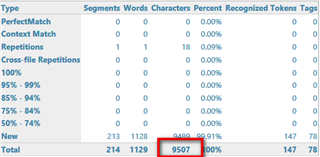
    I don't have a good answer for you.  Here's what I get using 2014 with your file:

    Screenshot of Trados Studio 2014 analysis showing 213 new segments and a total of 1129 words with a red box highlighting 9507 characters at 90%.

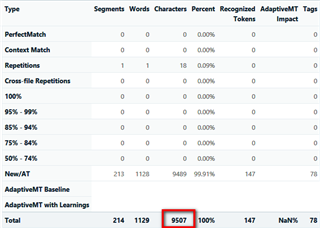
    Here's what I get using 2019:

    Screenshot of Trados Studio 2019 analysis displaying 213 new segments and a total of 1129 words with a red box highlighting 9507 characters at 100%.

    So I can't comment on your differences.  There were no notes in the slides you provided so perhaps you pseudotranslated with 2019 and you didn't actually extract the notes in the originals?  Maybe that's where your differences lie?

    My guess is the same with the Doc.  You probably have some setting different.  Have you been through both sets of options thoroughly to make sure you are comparing apples with apples?

    Paul Filkin | RWS

    Design your own training!
    You've done the courses and still need to go a little further, or still not clear? 
    Tell us what you need in our Community Solutions Hub

    emoji


    Generated Image Alt-Text
    [edited by: Trados AI at 5:32 PM (GMT 0) on 28 Feb 2024]
  • Hello Paul,

    Thank you for your reply and notes! I pseudo-translated with Trados 2014, so this is certain. Also, the powerpoint I sent to you as pseudo-translation has no footnotes, it is a different one from the one I received from the customer. So the difference in the volume is not there. I will continue with several tests and documents and I will return to you with a feedback. I will also carefully check the options I have selected in the tools. Hopefully they are the source for this situation, although we didn't change anything there when installing the software.   

  • Dear Paul,

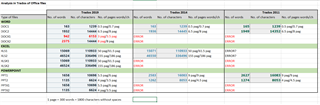
    I have analysed 2 different word files, 2 powerpoint files and 2 excel files, both as old and new version, with all 3 Trados software, that is 2019, 2014 and 2011. I am attaching a print screen with the comparison between the results. 

    What I noticed:

    1. New versions of office documents are not supported neither by 2011 nor 2014. I receive an error when analyzing them.

    2. There is a difference between the no of characters and the no of words, for the same document. What I mean here is that, instead of the 6:1 ratio for characters and words, there is a difference, so the characters result into more pages than the words. And I applied the rule 300 words equal 1800 characters without spaces. I don't know why this difference exists...

    3. There are several differences when analyzing the same file with Trados 2019 and then with Trados 2014 and 2011, that is for example for ppt, you get less volume in Trados 2019 than with the other 2 versions of Trados.

    The only issue at this moment is that we don't know which Trados version to rely for the correct evaluation of a document. We would like to avoid the situation when our translators, who don't usually have the last version of Trados, to return to us and say that they have a different result. We don't know what to believe.

    Thank you very much for your kind support and advice on this important aspect, especially for translation agencies,

    CristinaScreenshot of Trados Studio analysis comparison table showing different results for word count and character count across Trados 2019, 2014, and 2011 versions. Errors are highlighted in red for unsupported new versions of office documents in Trados 2011 and 2014.

    emoji


    Generated Image Alt-Text
    [edited by: Trados AI at 5:32 PM (GMT 0) on 28 Feb 2024]
  • Dear Paul,

    Do you have any news on this situation with the difference between Trados versions, but also between document versions and characters/ words? So far, we can only decide to use Trados 2014 and analyze only old versions of office documents, so that we can rely on the same result. I have attached in my previous message an analysis that I did for all possible situations and highlighted where there were differences in the analysis. Your feedback is much appreciated! Thank you!

  • The first thing I suggest you do is take a small piece of text and analyse the differences yourself.  The files you sent me previously were not helpful.  If you do this with small pieces of text, paying attention to words that are hyphenated, uses of obliques, phrases with different punctuation etc. then you will probably fnd the differences.

    1. New versions of office documents are not supported neither by 2011 nor 2014. I receive an error when analyzing them.

    Of course.  Latest versions of most file formats will not be supported in such old versions of the software that are no longer supported.

    3. There are several differences when analyzing the same file with Trados 2019 and then with Trados 2014 and 2011, that is for example for ppt, you get less volume in Trados 2019 than with the other 2 versions of Trados.

    If you were to read the relese notes for all of these versions you would see that changes are made sometimes to the way wordcounts are handled.  In general we try to make sure that the wordcount for Studio reflects the effort but obvioulsy if you have a diverse supply chain using multiple versions of the software then you will always see some differences between them.  Which one is right?  Well, do you consider sub-title to be two words or one?  That was just an example but in 2015 there were new options introduced to treat words that are:

    • hyphenated
    • joined by dashes
    • contain formatting tags

    as one.  But its optional in your settings, so again understanding where your differences are coming from, and only you can do this as we can't see your text, will help you to make sure you are using the appropriate settings to help bring the wordcounts into line.

    That's just an example, I'm pretty sure that between Studio 2011 and Studio 2019 there have been many changes.  In reality you are comparing tools that can count the words in the way you think they should be counted with tools that were out of support a long time ago and don't have these capabilities.  Which one is right?  That would be up to you.  If you want to match your traslators tools when they use such old versions that play with the settings to try and get closer or just rely on their counts.  If this is ultimately what you are trying to achieve it might simply be less effort to accept the counts from their tools given this is what you seem to trying to achieve.

    The only issue at this moment is that we don't know which Trados version to rely for the correct evaluation of a document. We would like to avoid the situation when our translators, who don't usually have the last version of Trados, to return to us and say that they have a different result. We don't know what to believe.

    You need to make sure you prepare the analysis with the right settings to get as close as possible to the count your translators are seeing.  Or perhaps use an independent tool such as practicount?  This will inevitably give you a different word count again but at least it'll be one all your supply chain can agree on if they use the same tool.  Or maybe convince your ranslators to upgrade Studio so they are on the same version you are using.

    No easy answer I'm afraid!  It's going to take an understanding of the content you are translating, with the settings you are using... and even then you probably won't come out with exactly the same result.

    Paul Filkin | RWS

    Design your own training!
    You've done the courses and still need to go a little further, or still not clear? 
    Tell us what you need in our Community Solutions Hub

Reply
  • The first thing I suggest you do is take a small piece of text and analyse the differences yourself.  The files you sent me previously were not helpful.  If you do this with small pieces of text, paying attention to words that are hyphenated, uses of obliques, phrases with different punctuation etc. then you will probably fnd the differences.

    1. New versions of office documents are not supported neither by 2011 nor 2014. I receive an error when analyzing them.

    Of course.  Latest versions of most file formats will not be supported in such old versions of the software that are no longer supported.

    3. There are several differences when analyzing the same file with Trados 2019 and then with Trados 2014 and 2011, that is for example for ppt, you get less volume in Trados 2019 than with the other 2 versions of Trados.

    If you were to read the relese notes for all of these versions you would see that changes are made sometimes to the way wordcounts are handled.  In general we try to make sure that the wordcount for Studio reflects the effort but obvioulsy if you have a diverse supply chain using multiple versions of the software then you will always see some differences between them.  Which one is right?  Well, do you consider sub-title to be two words or one?  That was just an example but in 2015 there were new options introduced to treat words that are:

    • hyphenated
    • joined by dashes
    • contain formatting tags

    as one.  But its optional in your settings, so again understanding where your differences are coming from, and only you can do this as we can't see your text, will help you to make sure you are using the appropriate settings to help bring the wordcounts into line.

    That's just an example, I'm pretty sure that between Studio 2011 and Studio 2019 there have been many changes.  In reality you are comparing tools that can count the words in the way you think they should be counted with tools that were out of support a long time ago and don't have these capabilities.  Which one is right?  That would be up to you.  If you want to match your traslators tools when they use such old versions that play with the settings to try and get closer or just rely on their counts.  If this is ultimately what you are trying to achieve it might simply be less effort to accept the counts from their tools given this is what you seem to trying to achieve.

    The only issue at this moment is that we don't know which Trados version to rely for the correct evaluation of a document. We would like to avoid the situation when our translators, who don't usually have the last version of Trados, to return to us and say that they have a different result. We don't know what to believe.

    You need to make sure you prepare the analysis with the right settings to get as close as possible to the count your translators are seeing.  Or perhaps use an independent tool such as practicount?  This will inevitably give you a different word count again but at least it'll be one all your supply chain can agree on if they use the same tool.  Or maybe convince your ranslators to upgrade Studio so they are on the same version you are using.

    No easy answer I'm afraid!  It's going to take an understanding of the content you are translating, with the settings you are using... and even then you probably won't come out with exactly the same result.

    Paul Filkin | RWS

    Design your own training!
    You've done the courses and still need to go a little further, or still not clear? 
    Tell us what you need in our Community Solutions Hub

Children
No Data