 Translate



Hello, Studio 2019 is not allowing me to export a TM to tmx. I get the error message below. How to solve this? Thanks.
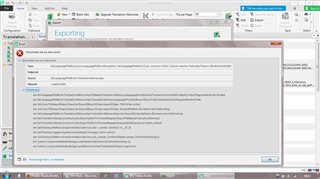
Generated Image Alt-Text
[edited by: Trados AI at 5:03 PM (GMT 0) on 28 Feb 2024]

You are currently working on UAT

Hello, Studio 2019 is not allowing me to export a TM to tmx. I get the error message below. How to solve this? Thanks.


Hello @Sandra R.
The error message might indicate the TM has become corrupt-
Please try repairing the TM- you can use the following free app
Oana Nagy | QA Engineer | RWS Group
Hi Steven,
Thanks. Have just tried that but it did not work, I get the same error. But this is happening with more than one TM, so I think the problem is not with the TMs.

Hi Sandra R.
First of all, try a Windows Repair of Studio and MultiTerm components, as here:
installation and licensing help
Select 'Installation' from the 'Case type' dropdown menu.
Someone will help in the next day or two if you give your correct email address.
All the best,
Ali :)
Hi,
We've been having problems exporting to tmx in Studio 2017 since the latest update. So not sure whether this will help in 2019 and this may only work for TM's that hadn't been 'upgraded' yet, but we are able to solve the problem by 'upgrading' the tm (right-click it and then select 'Upgrade translation memory').
Regards,
Lieven
There were definitely some internal changes in the API, I can see my STraSAK automation scripts throwing errors when exporting to TMX using Studio 2017 with the latest update. The TMX is exported indeed, but the error message says something about different number of parameters in some constructor and the script does not display any progress information.
This did not happen with older build I was using for years (and for development of my scripts) - there were no error messages and the export progress info worked perfectly.
Hi Alison,
I will try that later on and let you know if the problem was or not solved.
Thanks,
Hi Lieven, I also have tried that and at least with 2019 it does not solve the problem. But I have been able to export with no problem with 2019, this happened for the first time yesterday.
Hi Sandra,
Could you send me a problematic TM to rcornea@sdl.com so we could have investigate the issue ?
Best regards,
Robert
Hi Robert,
Ok, I will send it.
Thanks,
sandra
Hi Sandra,
I’ve used the same version Studio 2019 CU 3 and with the TM provided by you. At first I got the same error as you but after the TM upgrade everything worked as expected. Also imported the exported TM and exported it again without any issues.
Best regards,
Cornea Robert
P.S Data that you provided will be deleted from our systems.
