 Translate



Hello, Studio 2019 is not allowing me to export a TM to tmx. I get the error message below. How to solve this? Thanks.
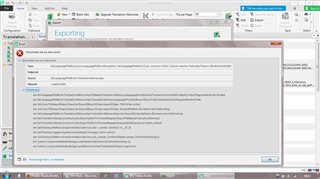
Generated Image Alt-Text
[edited by: Trados AI at 5:03 PM (GMT 0) on 28 Feb 2024]

You are currently working on UAT

Hello, Studio 2019 is not allowing me to export a TM to tmx. I get the error message below. How to solve this? Thanks.


Hello @Sandra R.
The error message might indicate the TM has become corrupt-
Please try repairing the TM- you can use the following free app
Oana Nagy | QA Engineer | RWS Group
Hi Steven,
Thanks. Have just tried that but it did not work, I get the same error. But this is happening with more than one TM, so I think the problem is not with the TMs.

Hi Sandra R.
First of all, try a Windows Repair of Studio and MultiTerm components, as here:
installation and licensing help
Select 'Installation' from the 'Case type' dropdown menu.
Someone will help in the next day or two if you give your correct email address.
All the best,
Ali :)
Hi Sandra R.
First of all, try a Windows Repair of Studio and MultiTerm components, as here:
installation and licensing help
Select 'Installation' from the 'Case type' dropdown menu.
Someone will help in the next day or two if you give your correct email address.
All the best,
Ali :)
Hi Alison,
I will try that later on and let you know if the problem was or not solved.
Thanks,
