 Translate



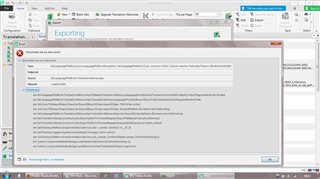
Hello, Studio 2019 is not allowing me to export a TM to tmx. I get the error message below. How to solve this? Thanks.
Generated Image Alt-Text
[edited by: Trados AI at 5:03 PM (GMT 0) on 28 Feb 2024]

You are currently working on UAT

Hello, Studio 2019 is not allowing me to export a TM to tmx. I get the error message below. How to solve this? Thanks.


Hello @Sandra R.
The error message might indicate the TM has become corrupt-
Please try repairing the TM- you can use the following free app
Oana Nagy | QA Engineer | RWS Group
Hello @Sandra R.
The error message might indicate the TM has become corrupt-
Please try repairing the TM- you can use the following free app
Oana Nagy | QA Engineer | RWS Group
Hi Steven,
Thanks. Have just tried that but it did not work, I get the same error. But this is happening with more than one TM, so I think the problem is not with the TMs.

Hi Sandra R.
First of all, try a Windows Repair of Studio and MultiTerm components, as here:
installation and licensing help
Select 'Installation' from the 'Case type' dropdown menu.
Someone will help in the next day or two if you give your correct email address.
All the best,
Ali :)
Hi Alison,
I will try that later on and let you know if the problem was or not solved.
Thanks,
Hi Sandra,
Could you send me a problematic TM to rcornea@sdl.com so we could have investigate the issue ?
Best regards,
Robert
Hi Robert,
Ok, I will send it.
Thanks,
sandra
Hi Sandra,
I’ve used the same version Studio 2019 CU 3 and with the TM provided by you. At first I got the same error as you but after the TM upgrade everything worked as expected. Also imported the exported TM and exported it again without any issues.
Best regards,
Cornea Robert
P.S Data that you provided will be deleted from our systems.
Hi Sandra,
Thanks for the support I discovered the issue. There are 2 buttons to upgrade the TM's one on the ribbon and one in the context menu of the TM itself ( right click on the TM). Now for some reason the one from the ribbon gives the error that you provided and the other one works. I raised an issue internally and it will be fixed in the future releases. For CU 3 as a workaround I recommend to use the one from the context menu to export the TM.
Best regards,
Cornea Robert
