You are currently working on UAT 

After deleting a comment in the editor, Studio always jumps back to comment #1 (bug?)

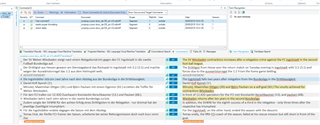
I'm experiencing a very annoying behaviour in Studio 2017: I'm checking a translation with a lot of comments. I run through the comments one after a time. Only a subset of the comments is directed at me. Whenever I delete a comment after editing the corresponding segment, Studio jumps back to the first comment (instead of going to the next). This makes the editing process very cumbersome, as I have to manually locate the next unchecked comment.

I suppose this is a bug? Or is there some setting I'm missing? Is it a feature?

Many thanks in advance,

kind regards,

Erik

Parents
  • Hello @ ,

    The issue with the jumping cursor seems to be very sporadic ( there have only been a couple of similar instances reported in the community over the last couple of years (irrelevant of the version).

    One theory is that this might be a local language keyboard issue- hence why no one is able to reproduce the error.

    Maybe try resetting windows layout  and see if this helps-

    Trados Studio screenshot showing the 'View' tab with an arrow pointing to the 'Reset Window Layout' option highlighted in yellow.

    If not- maybe its worth ensuring everything is up to date- (parts 1 and 2)

    https://community.sdl.com/product-groups/translationproductivity/w/customer-experience/3392/how-to-part-1-trouble-shoot-unexplained-errors-and-unwanted-behaviour-in-studiomultiterm

    Your feednack on whether anything helped would be appreciated.

    Oana Nagy | QA Engineer | RWS Group

    emoji


    Generated Image Alt-Text
    [edited by: Trados AI at 4:43 PM (GMT 0) on 28 Feb 2024]
  • Hello Steven,

    Thanks for getting back to me. 

    Resetting the windows layout doesn't help. I'm also running the latest updates.

    Just to make sure: I can reliably reproduce this. Minimal steps as follows:

    1. Open a short text to translate.

    2. Enter n (n>=3) comments in different segments.

    3. Delete comment #m (1<m<n) (by right-clicking in the comments window and selecting "delete" from the context menu).

    Following these steps, the former comment #m+1 should become active (and now be comment #m, since the one before has been deleted). Instead, the active comment will always be #1.

    If you want to check for local language keyboard setting: I'm using the software in German, with a German keyboard layout.

    Thanks for looking into this.

    Kind regards,

    Erik

  • Hello @

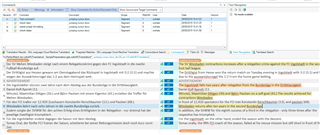
    I have created a new document and added comments in 4 segments- cursor is at this stage visible in segment 8

    Trados Studio interface showing a document with comments in segments 1, 2, 3, and 4, and the cursor active in segment 8.

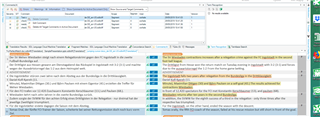
    I have now purposely made Segment 11 (No comments) active

    Trados Studio interface with segment 11 active, no comments present, and the comment in segment 1 deleted.

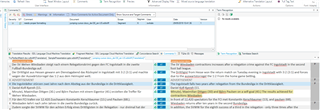
    and deleted the comment in Seg 1

    The cursor in this instance returns to Seg 1

    Close-up of Trados Studio interface highlighting the deletion of a comment in segment 1 and the cursor returning to that segment.

    However if (and i think this is the way you would work) you want to delete say the fourth comment and you move to segment 8- then the cursor does not spring back to seg 1.

    The behaviour you describe only happens if the segment with the comment to be deleted is not active.

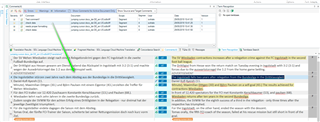
    Now if I delete a comment in a none active segment- then the editor springs to this segment- enabling me to recheck (and undo) if necessary

    Trados Studio interface showing the cursor remaining in segment 8 after deleting a comment in a non-active segment.

    I have tried many different variants/combinations and i simply cannot get the cursor to spring back to Seg 1 except how I described at the beginning.

    Oana Nagy | QA Engineer | RWS Group

    emoji


    Generated Image Alt-Text
    [edited by: Trados AI at 4:43 PM (GMT 0) on 28 Feb 2024]
  • Hi Steven,

    Thanks for taking the time!

    I see there is a misunderstanding here, I probably haven't expressed myself clearly.

    I'm not talking about the cursor jumping in the editor window. The problem is in the way that the active comment proceeds.

    Check this:

    1. In a number of comments, activate any one (except the first), in the comments pane. The segment is now blue.

    2. Delete the activated comment.

    Actual behaviour after that: Comment #1 will be activated (blue).

    Expected behaviour: The comment following the one I've just deleted is activated (blue).

    Use case: I'm checking a file with a lot of comments. I'm checking these comments one by one. After solving the issue mentioned in the comment, I delete the comment. Some comments will not be deleted (for a variety of reasons). The fact that after deleting a comment, I'll always have to restart at the beginning of the list (forcing me to remember where I was before), which is really annoying.

    I hope I've made the problem clearer now?

    Let me know if anything is still unclear.

    Kind regards,

    Erik

Reply
  • Hi Steven,

    Thanks for taking the time!

    I see there is a misunderstanding here, I probably haven't expressed myself clearly.

    I'm not talking about the cursor jumping in the editor window. The problem is in the way that the active comment proceeds.

    Check this:

    1. In a number of comments, activate any one (except the first), in the comments pane. The segment is now blue.

    2. Delete the activated comment.

    Actual behaviour after that: Comment #1 will be activated (blue).

    Expected behaviour: The comment following the one I've just deleted is activated (blue).

    Use case: I'm checking a file with a lot of comments. I'm checking these comments one by one. After solving the issue mentioned in the comment, I delete the comment. Some comments will not be deleted (for a variety of reasons). The fact that after deleting a comment, I'll always have to restart at the beginning of the list (forcing me to remember where I was before), which is really annoying.

    I hope I've made the problem clearer now?

    Let me know if anything is still unclear.

    Kind regards,

    Erik

Children