You are currently working on UAT 

Two instances of SDL Trados Studio 2017 in list of apps

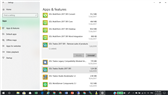
I have two instances of SDL Trados Studio 2017 SR1 in the list of Apps & Features in Windows 10Windows 10 Apps & Features list showing two instances of SDL Trados Studio 2017 SR1, one with 'Remove suite of products' label, both with greyed out Modify button.. One says SDL Trados Studio 2017 SR1 – Remove suite of products; the other one just says SDL Trados Studio 2017 SR1. The Modify button is greyed out on both. A screenshot is attached. Is this normal? If not, how can I fix the problem? Thank you.


Generated Image Alt-Text
[edited by: Trados AI at 4:31 PM (GMT 0) on 28 Feb 2024]

emoji
Parents
  • Hi 

    The 'Remove suite of products' instance is indeed that which it says. It uninstalls SDL Trados Studio 2017 SR1. You can't modify it, only click on 'Uninstall' and it will remove Studio. 

    However, as you say, in the list of Apps & Features, the only option for SDL Trados Studio 2017 SR1 entry is ALSO Uninstall, which is not as it should be. I don't know why.

    To achieve the full features you should have accessible, type 'Control panel' into your 'Type here to search' window by your Windows start button bottom left of your screen (then if necessary select View by: 'Small icons') then click on 'Programs and Features' and you will see the more traditional version appear...

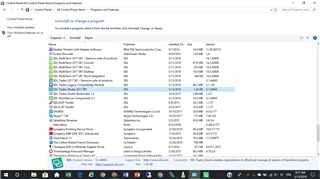
    Screenshot of the Programs and Features window showing a list of installed software, including SDL Trados Studio 2017 SR1 with the option to 'Uninstall' or 'Change'.

    In this list, a right-click or a look at the top bar will show you that you can, again, uninstall using the 'Remove suite of products' instance but that if you highlight the main instance of SDL Trados Studio 2017 SR1, you also have the option to 'Repair'. This is a very useful feature and should be used now and again, after big Windows updates for example, to make sure that Studio runs smoothly with all its features. 

    In fact, it is useful to run this 'Windows Repair' on any complex piece of software that has the facility.

    Hope this helps!

    All the best,

    Alison Slight smile

    emoji


    Generated Image Alt-Text
    [edited by: Trados AI at 4:31 PM (GMT 0) on 28 Feb 2024]
  • Hi Alison,

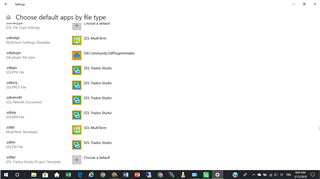
    I did as you suggested and repaired the SDL Trados Studio 2017 R1 instance. I then uninstalled the SDL Trados 2017 R1 - Remove suite of products instance but then both instances disappeared. I re-installed Studio 2017 from the website but both instances still show up. Studio works fine except I cannot open a project from the file itself like I used to, only from Studio using the Open Package option. When I click on the .sldppx file, it opens a new instance of Studio but not the file itself. The .sdlppx, .sdlproj and .sdlprpx file types are associated with Studio 2017 so that does not seem to be the problem. Screenshot of 'Choose default apps by file type' settings showing .sdlppx, .sdlproj, and .sdlprpx file types associated with SDL Trados Studio.. It is only a minor annoyance but I would like to be able to open the file directly from the file itself if possible. Any advice would be welcome.

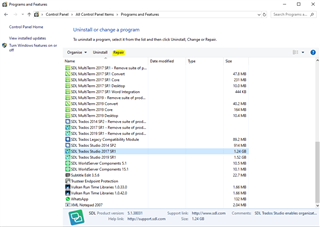
    Thanks. Screenshot of 'Uninstall or change a program' window with SDL Trados Studio 2017 R1 highlighted, indicating it is installed.

    Michele

    emoji


    Generated Image Alt-Text
    [edited by: Trados AI at 4:31 PM (GMT 0) on 28 Feb 2024]
  • Hi 

    I'm sorry if I didn't explain clearly enough. Both instances are ALWAYS there and that is correct. The uninstall Studio 2017 entry is the best way to uninstall Studio and the main Studio 2017 entry is to be used for Windows Repair when it is needed. 

    The Windows Repair wasn't a suggested solution for the two instances 'problem' as it isn't a problem because that is how the entries always appear, correctly. I was just explaining that you can use a Windows Repair when there IS a problem.

    As for your problem with double-clicking a project package file opening a second instance of Studio, I can't reproduce this. It works fine for me. If I have Studio open and I click on a project package in Windows Explorer, then the same instance of Studio opens the Open Package Wizard correctly.

    Maybe this time a Windows Repair of Studio (the main instance, not the uninstallation instance) might solve this?

    In Control Panel > Programs and features, right click 'SDL Trados Studio 2017 SR1' and select 'Repair' from the dropdown menu that appears. Or click Repair on the toolbar at the top as in your image.

    I hope this clarifies things...

    All the best,

    Ali Slight smile

  • Hi Alison.

    Thanks for the explanation. I'm happy to hear that seeing two instances of Studio in the list of applications is normal. As for the problem with opening a Studio package from the file itself, I did some searching and came across the following post:

    https://community.sdl.com/product-groups/translationproductivity/f/studio/7319/how-to-restore-sdlppx-sdl-trados-studio-project-package-file-association

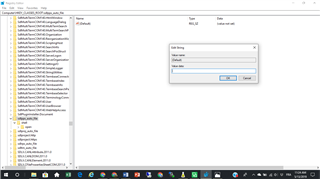
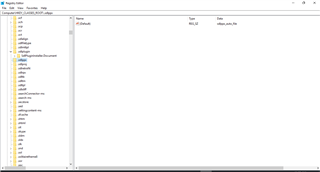
    Paul Filkin mentions a Registry Editing solution because it seemed that HKEY_CLASSES_ROOT\.sdlppx pointed to the wrong version of Studio. In that case, the problem appeared after the user upgraded from Studio 2014 to Studio 2015. In my case, I upgraded from Studio 2015 to Studio 2017. I deleted the old 2015 but it's possible that some registry values may have survived. I checked the registry values and I found .sdlppx pointing to sdlppx_auto_file and further down sdlppx_auto_file with "value not set" under Data (screenshots are attached). At this point I'm wondering whether I should enter something (iSDL.TradosProjectPackage.1?) in the Value data field shown in the screenshot or remove both .sdlppx and sdlppx_auto_file then repair Studio as suggested by Paul.

    Any advice? Thanks.Screenshot of Windows Registry Editor showing .sdlppx extension with 'Data' column displaying 'value not set'. Edit String dialog box is open with 'Value data' field empty.Screenshot of Windows Registry Editor displaying a list of file extensions. The .sdlppx extension is highlighted, showing no associated value in the 'Data' column.

    emoji


    Generated Image Alt-Text
    [edited by: Trados AI at 4:31 PM (GMT 0) on 28 Feb 2024]
Reply Children