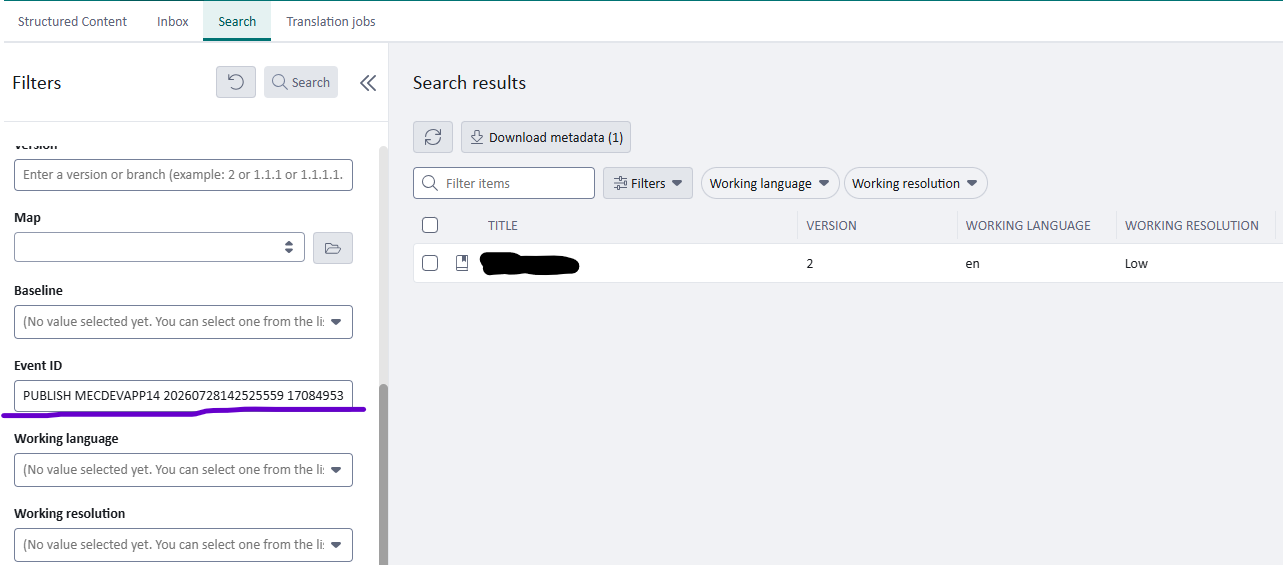
Is there an easy way to go from a publish event to the publication?

 If I see a failed publish event in Tridion Docs 15.2.1, as a super user I want to go to the publication to check and correct the error.

I have to open the details of the "Started publish process" step to be able to copy the GUID of the publication, and then search for that in the Structured Content tab... Does anyone have any tips on how to get there faster?

emoji
Parents
  • Hi  ,

    As an alternative option with minimal customization, you can use the FISHEVENTID field on the Publication language level and search for it.

    For this, you need to extend the Search form for Publications with an extra Event ID field.

    To do this, you need to adjust your MetadataConfig.xml, which is usually located in \%Installation_Location%\Web_DeploymentName\Author\ASP\ClientConfig

    Find <ishfrm id="Trisoft.InfoShare.Forms.Searcher.SearchPublicationControl"> and add a new ishfrmfield

    <ishfrmfield name="PublicationEventIdField" ishfieldref="FISHEVENTID" level="lng">
    <label>Event ID</label>
    <description>External publishing event identifier.</description>
    <typetext />
    <fulltextsearchoperator>equal</fulltextsearchoperator>
    </ishfrmfield>

    You might need to restart your application.

    As a result your can copy the Event ID from the list of Events and use it in a search form.


    Hope this helps

    emoji
Reply
  • Hi  ,

    As an alternative option with minimal customization, you can use the FISHEVENTID field on the Publication language level and search for it.

    For this, you need to extend the Search form for Publications with an extra Event ID field.

    To do this, you need to adjust your MetadataConfig.xml, which is usually located in \%Installation_Location%\Web_DeploymentName\Author\ASP\ClientConfig

    Find <ishfrm id="Trisoft.InfoShare.Forms.Searcher.SearchPublicationControl"> and add a new ishfrmfield

    <ishfrmfield name="PublicationEventIdField" ishfieldref="FISHEVENTID" level="lng">
    <label>Event ID</label>
    <description>External publishing event identifier.</description>
    <typetext />
    <fulltextsearchoperator>equal</fulltextsearchoperator>
    </ishfrmfield>

    You might need to restart your application.

    As a result your can copy the Event ID from the list of Events and use it in a search form.


    Hope this helps

    emoji
Children
No Data