
DraftSpaces attributes show up as unconfigured

I have looked through all the documentation on the docs.sdl.com site and haven't found a solution to display attribute names in Draft Spaces, they all show up as unconfigured. Any help is appreciated.
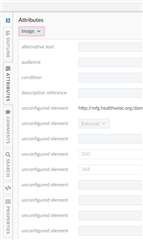
Trados Studio Draft Space showing a list of attributes with several labeled as 'unconfigured element' and one external link 'http:schemas.sdl.comosl1.0'.


Generated Image Alt-Text
[edited by: Trados AI at 6:46 AM (GMT 0) on 5 Mar 2024]
emoji
Parents Reply
  • Hi Pam, thank you for the suggestion, I look it and ran with it. The issue was with the sample behaviourConfig.xml in the documentation. The following config was setting all the attributes to "unconfigured element". Once I remove it, all attributes showed up as expected.


    <behaviorscopegroup name="Common for all DTDs/schemas">
    		<behaviorgroup>
    			<blockgenericicon xpath="self::*" icon="sort-alpha-asc" 
           tooltipquery="./string(node-name(.))" priority="-5">
    				<label>Unconfigured element</label>
    			</blockgenericicon>			
    		</behaviorgroup>
    	</behaviorscopegroup>


Children