
DraftSpaces attributes show up as unconfigured

I have looked through all the documentation on the docs.sdl.com site and haven't found a solution to display attribute names in Draft Spaces, they all show up as unconfigured. Any help is appreciated.
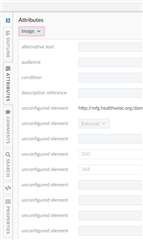
Trados Studio Draft Space showing a list of attributes with several labeled as 'unconfigured element' and one external link 'http:schemas.sdl.comosl1.0'.


Generated Image Alt-Text
[edited by: Trados AI at 6:46 AM (GMT 0) on 5 Mar 2024]
emoji
Parents Reply
  • Using the same XSDs is the best place to start. That said, different tools may interpret XSDs differently. I'm not an XSD expert. It seems like there's something that needs to be slightly changed in order for your attributes to be recognized. Not sure this would be helpful, but perhaps use the OOTB XSDs and validate that those attributes display and then review the syntax and compare to the syntax of your XSDs. 

    Pam Noreault | Knowledge Center Solutions Architect

Children