How do I perform a where-used search for an output format in the Tridion web client?

Hello,

I have defined an output format in Output Formats in the Tridion Web Client for the purposes of testing it.

Now we decided to not use this output format at all, so I would like to delete it.

However, this deletion is not possible as the output format is defined and used in one or more publications.

Trying to delete it gives this message:

"0 item(s) were deleted successfully.

1 item(s) could not be deleted.

  • VOUTPUTFORMATTEST2PDF: The object cannot be deleted, because it is still used by one or more objects. Please generate a report or a full-text search to see where it is used"

However, I am unable to find a full text search expression that would locate the publications where the output format is used.

Has anyone else encountered this problem, and how did you solve it?

Many thanks for any input.

Best Regards

Peter S

Cytiva

Parents
  • Hi Peter,

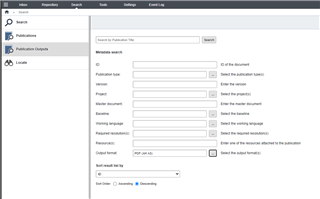
    Regarding OutputFormat usage, they are only used on PublicationOutput (so language level of publication versions). So those are the ones you should remove first, if you really want to delete this particular OutputFormat.

    Depending on the version of your software - the version is the shortest piece of information that describes how your system behaves.

    Either over here...

    Trados Studio interface showing the Publication Outputs section with various fields such as Publication type, Version, Project, Working language, and Output format.

    Since Docs 14SP2/14.0.2 you can also mark an OutputFormat as "inactive" which means it is still a good value for the CMS, but it is removed from any dropdowns when creating new PublicationOutputs.

    Or potentially query over the PowerShell toolkit called https://github.com/sdl/ISHRemote/ 

    New-IshSession -WsBaseUrl https://ish.example.com/ -PSCredential Admin
    Find-IshPublicationOutput -MetadataFilter (Set-IshMetadataFilterField -Level Lng -Name FISHOUTPUTFORMATREF -ValueType Element -FilterOperator Equal -Value VOUTPUTFORMATSDLLIVECONTENTREACHEXTERNAL)

    -Dave

    emoji


    Generated Image Alt-Text
    [edited by: Trados AI at 6:40 AM (GMT 0) on 5 Mar 2024]
  • Hi Dave,

    We're still in 13.0.2, but we do have the option to select "inactive". However, the output format still shows up in the output pane, so it doesn't seem to work.

    We don't have the Publication Version tab in the web client either.

    So it seems I'm stuck with an output format that cannot be deleted and cannot be made invisible for the users.

    Good lesson about what to not to do and in my opinion a lapse in design of the application.

    BR

    Peter

Reply Children
No Data