You are currently working on UAT 

ASKED TO CONFIGURE FOR FIRST TIME USE - ALL PROJECTS DISAPPEARED

Hello,

For the past couple of days, every time I turn my computer back on and open Studio 2015 (running on Windows 10), I am asked to configure the program for first-time use. If I cancel the process, I cannot open the program. So I go through the set-up process and once Trados is open, all my previous projects have disappeared. I then have to open the projects manually, but I cannot open all of them. For example, I finished a project yesterday and now, when I try to open it back, I get a message saying that Trados does not recognize the file version and it doesn't open. I am pretty frustrated. Please help! Thanks!!!

Parents
  • Susana

    Is this your private computer or a company administrated PC?
    The reason I ask is because what you describe is most probably due to the fact that your logged-in user does not have sufficient rights. Once you have gone through the first startup screens, Studio writes entries to the registry and updates some files, so it knows you have already gone through this. If it does not, it means that these entries/files could not be properly written.
    Are you the only user on this PC or do you have more than one account? Do you log in with the same user that was used to install Studio?
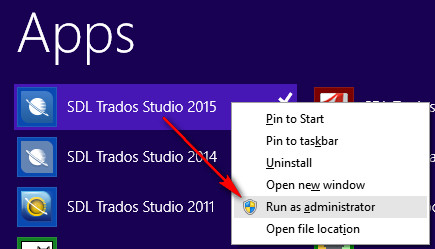
    Please launch Studio with administrator rights and see whether this solves your problem.
    If not, you may need to open a support ticket by going to
    support.xl8.one

    Walter

  • Thank you very much, Walter,

    I am the only user and it is my own personal SDL TRADOS account. Nobody else touches this computer nor do they use TRADOS.

    I assume I am always running the program as an administrator. I have never changed the way I run or open it. I am at a loss.

    By the way, every time I open the program the SDL Cloud window pops up advising me that I have xx free days left...

    Thanks again for your help!

  • Susana Magnani said:
    I assume I am always running the program as an administrator. I have never changed the way I run or open it. I am at a loss.

    Hi Susana,

    I think Walter is correct here.  Most likely you don't have sufficient rights for the program to run.  Perhaps try reinstalling but this time when you do it make sure you right-click on the exe file and select "run as administrator".  If it still doesn't behave try running Studio as admin when you start it.  You can do that by right-clicking on the icon and select "run as administrator"

    Regards

    Paul

    Paul Filkin | RWS

    Design your own training!
    You've done the courses and still need to go a little further, or still not clear? 
    Tell us what you need in our Community Solutions Hub

  • Thank you very much, Paul, for your kind answer and for moving the post to its right location.

    Since I read your response, I started opening Trados in the way you've indicated, and it has worked, as far as not getting the nagging "first-time configuration setup" issue. I'm still baffled because nothing has changed in my computer set up to grant this change in the way the program runs.

    Also, all the projects I used to have already in the list (over 100) are gone. I assume I'll have to charge them manually as I go.

    When I'm less busy I'll try going back to opening Trados directly and also, double-clicking projects to open it, as I used to, to see if it works (before I charge too many projects back in the list, lest they disappear once more!).

    Thanks again!

    Susana
Reply
  • Thank you very much, Paul, for your kind answer and for moving the post to its right location.

    Since I read your response, I started opening Trados in the way you've indicated, and it has worked, as far as not getting the nagging "first-time configuration setup" issue. I'm still baffled because nothing has changed in my computer set up to grant this change in the way the program runs.

    Also, all the projects I used to have already in the list (over 100) are gone. I assume I'll have to charge them manually as I go.

    When I'm less busy I'll try going back to opening Trados directly and also, double-clicking projects to open it, as I used to, to see if it works (before I charge too many projects back in the list, lest they disappear once more!).

    Thanks again!

    Susana
Children