Random code in segments translated with AI Assistant

Hello, 

When translating a file with AI Assistant (using Open AI), I get random code/software instructions appear in some segments. It generally appears as ```json
{ "transUnits": [ { "translation": " before the translation with ", "comment": "" }] }
``` added afterwards. I have added a screenshot to help illustrate this point. This was translated using AI assistant linked to my TM and glossary in Trados 2024. It does not affect every segment, only some, and I don't understand why.

Any help with this would be greatly appreciated.

Many thanks,

Jessica


Removed AI Suggestion
[edited by: Jessica Rees at 12:20 PM (GMT 1) on 7 Jul 2026]
emoji
  • Hello Jessica,

    Thank you for sharing the details of your issue! It seems that the random code appearing in your segments when using the AI Assistant in Trados Studio 2024 is likely due to how the AI Assistant is interpreting or processing the content. This can happen if the source text or the file type contains embedded code or metadata that the AI Assistant inadvertently includes in its output.

    Here’s a step-by-step guide to help you resolve this issue:

    ### Step 1: Check the Source File

    - Open the source file in a text editor to verify if there are any hidden code snippets, metadata, or formatting that might be causing the AI Assistant to misinterpret the content.

    - If you find such code, consider cleaning up the source file or adjusting the file type settings in Trados Studio to exclude non-translatable content.

    ### Step 2: Review File Type Settings in Trados Studio

    - Go to **File > Options > File Types** in Trados Studio.

    - Select the file type of your source document and click **Parser Settings**.

    - Ensure that only the translatable content is marked for translation. Exclude any code or metadata that should not be processed.

    ### Step 3: Adjust AI Assistant Settings

    emoji
  •  

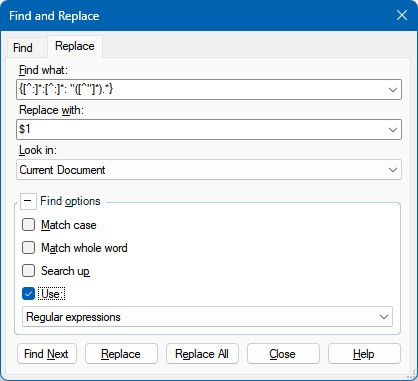
    This happens indeed sometimes. Just run a simple search and replace with this regex and all will be ok:

    Search pattern:

    {[^:]*:[^:]*: "([^"]*).*}

    Replace pattern

    $1

    Activate regex and replace all:

    This is the simplest and quickest solution to this problem.

    _________________________________________________________

    When asking for help here, please be as accurate as possible. Please always remember to give the exact version of product used and all possible error messages received. The better you describe your problem, the better help you will get.

    Want to learn more about Trados Studio? Visit the Community Hub. Have a good idea to make Trados Studio better? Publish it here.

    emoji