Autosuggest doesn't work in trados 2024 SR 1

Yesterday I installed the latest update from studio 2024 (SR1 18.1.2.6370) and since then autosuggest doesn't work. It is activated, I even made new AS-dictionaries, but the function simply doesn't work. Is there anythng special to do to get started after this upgrade?


Removed AI Suggestion
[edited by: patrick pubben at 9:58 AM (GMT 0) on 5 Nov 2025]

emoji
Parents Reply
  •  

    There is no AI connection

    You requested the response from the RWS Community AI above and in there it said:

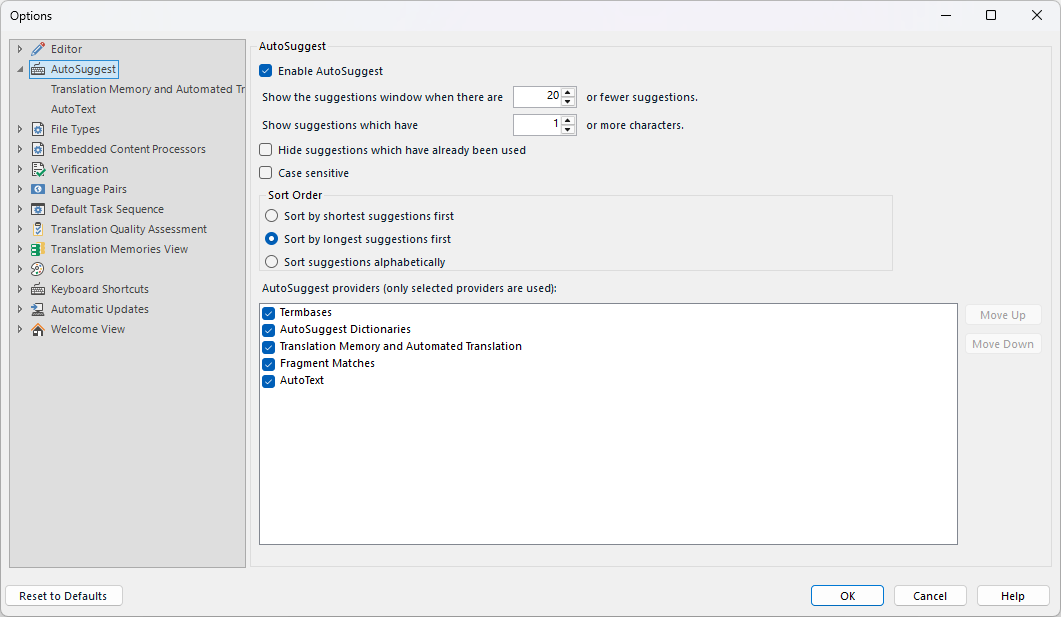
    Step 1: First, ensure that your AutoSuggest settings are correctly configured. Go to File > Options > AutoSuggest and verify that the appropriate AutoSuggest dictionaries and termbases are selected for your project.  

    Step 2: Check if the AutoSuggest feature is enabled. Sometimes, after an update, settings may revert to defaults.  

    So that would be these ones:

    Trados Studio AutoSuggest settings window showing options to enable AutoSuggest, set suggestion limits, and select AutoSuggest providers like Termbases and AutoText.

    That would be a good starting point since we don't know what you have configured.  All you said is that it doesn't work, so we don't know what else might be misconfigured.

    Paul Filkin | RWS

    Design your own training!
    You've done the courses and still need to go a little further, or still not clear? 
    Tell us what you need in our Community Solutions Hub

    emoji


    Generated Image Alt-Text
    [edited by: RWS Community AI at 2:23 PM (GMT 0) on 5 Nov 2025]
Children