Autosuggest doesn't work in trados 2024 SR 1

Yesterday I installed the latest update from studio 2024 (SR1 18.1.2.6370) and since then autosuggest doesn't work. It is activated, I even made new AS-dictionaries, but the function simply doesn't work. Is there anythng special to do to get started after this upgrade?


Removed AI Suggestion
[edited by: patrick pubben at 9:58 AM (GMT 0) on 5 Nov 2025]

emoji
  • Probability score: 0.6  

    Question improvement suggestion: Provide specific details about any error messages received or any troubleshooting steps already taken to resolve the issue.  

    In the meantime, based on the information you have provided, here is a suggested answer to your question:  

    Hello,  

    Step 1: First, ensure that your AutoSuggest settings are correctly configured. Go to File > Options > AutoSuggest and verify that the appropriate AutoSuggest dictionaries and termbases are selected for your project.  

    Step 2: Check if the AutoSuggest feature is enabled. Sometimes, after an update, settings may revert to defaults.  

    Step 3: If you have created new AutoSuggest dictionaries, ensure they are populated with the necessary terms. You can do this by updating your termbases and dictionaries to include the terms you expect to see.  

    Step 4: Adjust the minimum prefix length setting. If it's set too high, you may need to type more characters before suggestions appear. A lower value can help in getting suggestions sooner.  

    Step 5: If the issue persists, consider resetting your user profile shortcuts, as conflicts may arise from previous settings. You can do this by going to File > Options > Keyboard Shortcuts and clicking on 'Reset All'.  

    Step 6: Lastly, if none of the above steps work, a repair installation of Trados Studio may be necessary. You can do this through the Control Panel by selecting Trados Studio and choosing 'Repair'.  

    I hope this answer addressed your question. If not, please reject the answer, add the question improvement suggestion information, and click the RWS Community AI checkbox on the right to try again.  

    RWS Community AI

    emoji
  •  

    Can you share your settings?  You seem to have unchecked the AI response but not provided any of the screenshots that might help.

    Paul Filkin | RWS

    Design your own training!
    You've done the courses and still need to go a little further, or still not clear? 
    Tell us what you need in our Community Solutions Hub

    emoji
  • Which settings? There is no AI connection, the autosuggest dictionary is on my computer. Happy to send you any screenshots if you tell me which one you need.

    emoji
  •  

    There is no AI connection

    You requested the response from the RWS Community AI above and in there it said:

    Step 1: First, ensure that your AutoSuggest settings are correctly configured. Go to File > Options > AutoSuggest and verify that the appropriate AutoSuggest dictionaries and termbases are selected for your project.  

    Step 2: Check if the AutoSuggest feature is enabled. Sometimes, after an update, settings may revert to defaults.  

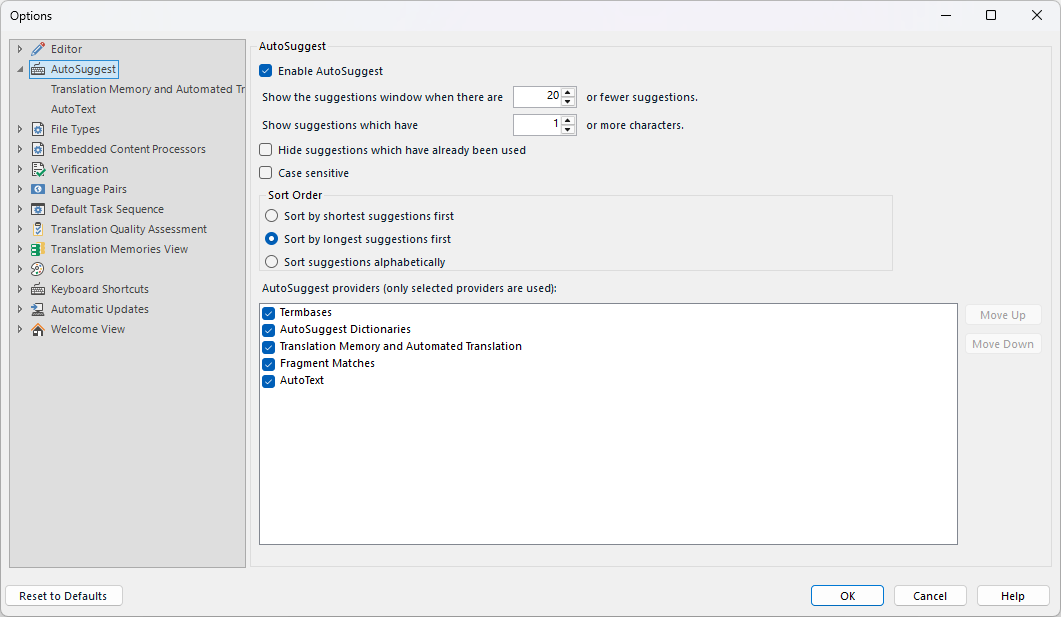
    So that would be these ones:

    Trados Studio AutoSuggest settings window showing options to enable AutoSuggest, set suggestion limits, and select AutoSuggest providers like Termbases and AutoText.

    That would be a good starting point since we don't know what you have configured.  All you said is that it doesn't work, so we don't know what else might be misconfigured.

    Paul Filkin | RWS

    Design your own training!
    You've done the courses and still need to go a little further, or still not clear? 
    Tell us what you need in our Community Solutions Hub

    emoji


    Generated Image Alt-Text
    [edited by: RWS Community AI at 2:23 PM (GMT 0) on 5 Nov 2025]
  • Hey Paul, I followed all the 6 steps from AI, even re-installed trados SR 2 and multiterm. In trados 2022, still running on my computer, everything works fine. Surely AS is enabled, and I made new dictionaries, that work fine under trados 2022.

    emoji
  • We will be pleased to help you with this problem so have logged a support case on your behalf. We do prioritise customers who have a support contract so please keep in mind it could take up to 48 hours, especially over a weekend, but rest assured we will contact you as soon as we can. You will be contacted at the email address used for this Community. Support Case Id : CS0030542.

    Paul Filkin | RWS

    Design your own training!
    You've done the courses and still need to go a little further, or still not clear? 
    Tell us what you need in our Community Solutions Hub

    emoji
  • Thanks Paul, really appreciate your effort. Autosuggest is one of my favourite tools...

    emoji
  • Hey Paul,

    I'm sorry to have to come back to this problem with autosuggest. I just installed trados 2024 on a new computer, and everything works, except for autosuggest. On the old computer it sometimes worked, but mostly didn't, I used studio 2022 instead and I didn't find time to bother. Now I didn't install 2022 on my new computer and the problem is urgent again. Maybe you can help me again. Seems this is a problem more users have. A colleague of mine who also translates into dutch has the same problem. 
    Kind regards, Patrick

    emoji