Exporting xlfs from Trados to be compatible with Madcap Lingo - Trados 2022

Hi, 

We recently translated some xlf files in Trados and our client has tried to import them back into MadCap Lingo but is getting the following error 'XLIFF in translation unit 5 is corrupt. Object reference not set to an instance of an object.'

Is anyone able to advise if there are any settings we need to use when handling xlf files in Trados in order to ensure they're compatible with MadCap lingo? I'm using the 2022 version of Trados. 

Thank you very much in advance for your help. 


I'm using the 2022 version of Trados.
[edited by: Sarah Place at 4:56 PM (GMT 0) on 10 Mar 2025]

emoji
Parents Reply
  •  

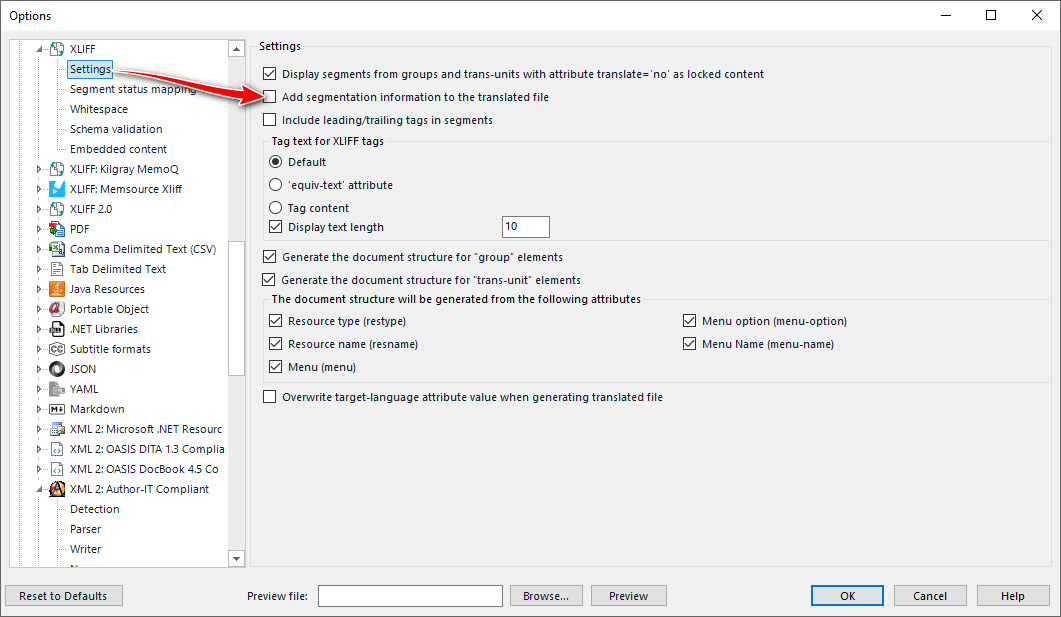
    Without seeing the full error message behind the generic object reference error title, and without seeing a sample of a file I can only guess.  Maybe make sure you don't have this option checked?  Most tools I have come across that work with XLIFF don't know what to do with this information and that could be the cause of a problem?

    Screenshot of Trados Studio options menu highlighting XLIFF settings with a red arrow pointing to 'Segment status mapping' option.

    Paul Filkin | RWS

    Design your own training!
    You've done the courses and still need to go a little further, or still not clear? 
    Tell us what you need in our Community Solutions Hub

    emoji


    Generated Image Alt-Text
    [edited by: RWS Community AI at 3:17 PM (GMT 0) on 11 Mar 2025]
Children