Trados Studio 2024 randomly crashes as long as my personal Multiterm Termbase is connected to the project

Trados Studio 2024 randomly crashes as long as my personal Multiterm Termbase is connected to the project. It happens when I confirm a segment. When it happens, I get an error message ("Object reference not set to an instance of an object") from time to time, but not systematically. As soon as I delete my Multiterm Termbase from the termbase list, the problem does not happen any more. 
Please help, as this is very inconvenient to me.

emoji
Parents Reply Children
  •  
     

    Hi everyone
    We had the same problem last week with one of our translators. In our case, resetting the user profile did the trick. Maybe you want to try this before doing a full reset.


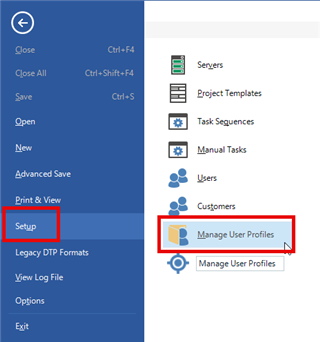
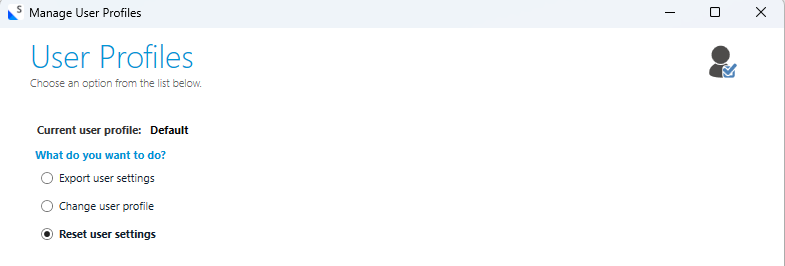
    You can do this by clicking on File > Setup > Manage User Profiles > Reset user settings
    Trados Studio interface showing the 'Setup' menu selected and 'Manage User Profiles' highlighted.

    Manage User Profiles window in Trados Studio with options to export user settings, change user profile, or reset user settings. 'Reset user settings' is selected.

    You might want to save a backup of your current user profile in the next step.

    Be aware: By resetting the user profile (or by doing a full reset), specific user-based settings need to be reapplied afterwards.


    Fingers crossed one of the solutions work.

    Good luck
    Seraina

    emoji


    Generated Image Alt-Text
    [edited by: RWS Community AI at 7:14 AM (GMT 1) on 1 Jun 2026]