Trados Studio 2024 randomly crashes as long as my personal Multiterm Termbase is connected to the project

Trados Studio 2024 randomly crashes as long as my personal Multiterm Termbase is connected to the project. It happens when I confirm a segment. When it happens, I get an error message ("Object reference not set to an instance of an object") from time to time, but not systematically. As soon as I delete my Multiterm Termbase from the termbase list, the problem does not happen any more. 
Please help, as this is very inconvenient to me.

emoji
Parents Reply Children
  • I'm currently facing the exact same issue with Trados Studio 2022 and Multiterm 2022. I’ve moved all my glossaries and translation memories to a different computer, and that has helped prevent Trados from randomly crashing. However, I’m also interested in learning how to perform a Trados reset. I assume the steps for the 2024 version would be similar to those for the 2022 version.

    Unfortunately, this situation is unacceptable. I know this isn’t the ideal place to complain, but as translators, we’re all working under pressure. We need and expect software that is reliable and rock-solid, not one that crashes randomly and forces us to waste hours of productivity.

    That said, I would appreciate it if you could provide the steps for resetting Trados.

    emoji
  • That said, I would appreciate it if you could provide the steps for resetting Trados.

    Here you go: gateway.sdl.com/.../communityknowledge

    _________________________________________________________

    When asking for help here, please be as accurate as possible. Please always remember to give the exact version of product used and all possible error messages received. The better you describe your problem, the better help you will get.

    Want to learn more about Trados Studio? Visit the Community Hub. Have a good idea to make Trados Studio better? Publish it here.

    emoji
  • I have serious problems with Multiterm, which only got worse after updating both Trados Studio 2024 and Multiterm to the most recent versions, reorganising my termbase, and rebooting my pc several times. Terms are not consistently recognized and when I try to enter a new term in the termbase, Trados just crashes. This is indeed unacceptable. I am at my wit's end. Any suggestions please? 

    emoji
  •  
     

    Hi everyone
    We had the same problem last week with one of our translators. In our case, resetting the user profile did the trick. Maybe you want to try this before doing a full reset.


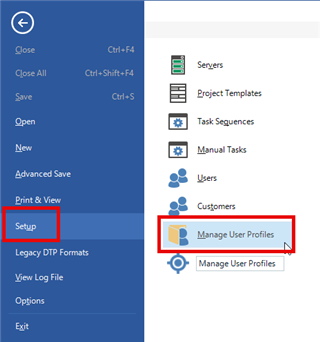
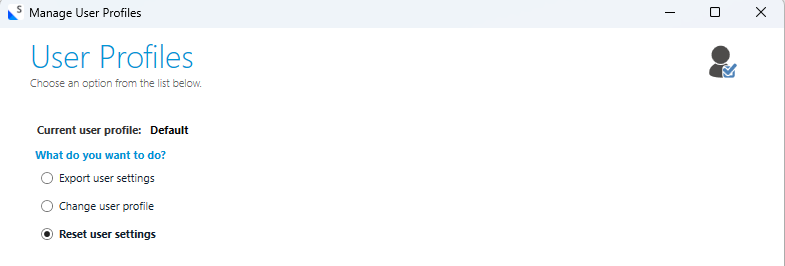
    You can do this by clicking on File > Setup > Manage User Profiles > Reset user settings
    Trados Studio interface showing the 'Setup' menu selected and 'Manage User Profiles' highlighted.

    Manage User Profiles window in Trados Studio with options to export user settings, change user profile, or reset user settings. 'Reset user settings' is selected.

    You might want to save a backup of your current user profile in the next step.

    Be aware: By resetting the user profile (or by doing a full reset), specific user-based settings need to be reapplied afterwards.


    Fingers crossed one of the solutions work.

    Good luck
    Seraina

    emoji


    Generated Image Alt-Text
    [edited by: RWS Community AI at 7:14 AM (GMT 1) on 1 Jun 2026]