This discussion has been locked.
You can no longer post new replies to this discussion. If you have a question you can start a new discussion

Inaccurate Confirmation Statistics in Trados Studio 2022

I have seen several times, the Confirmation Statistics showing in Trados Studio 2022 different numbers in the interface.

See those discrepancies below.

53% vs. 36% translated.

The correct number is the later

Is there a way to fix that
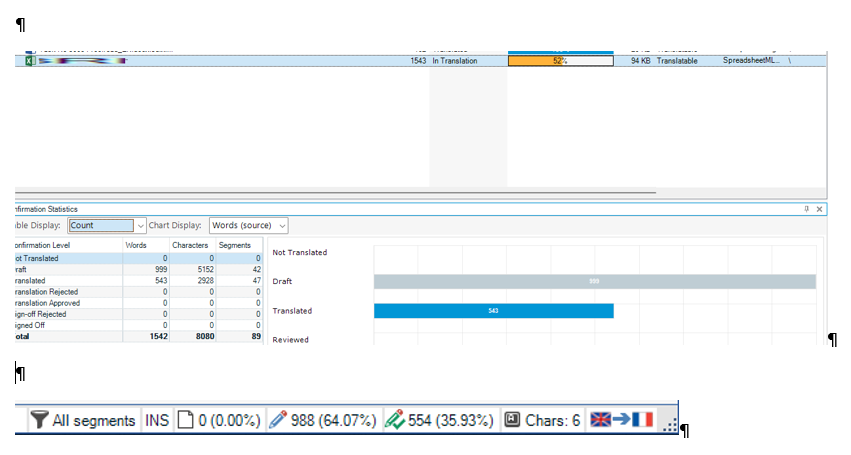
Screenshot of Trados Studio 2022 showing discrepancy in Confirmation Statistics with 999 words at 53% translated in the table, but the bottom bar indicates 554 words at 35.93% translated.os Studio 2022


Generated Image Alt-Text
[edited by: Trados AI at 8:32 AM (GMT 0) on 29 Feb 2024]

emoji
Parents Reply
  • I do not understand the logic here.

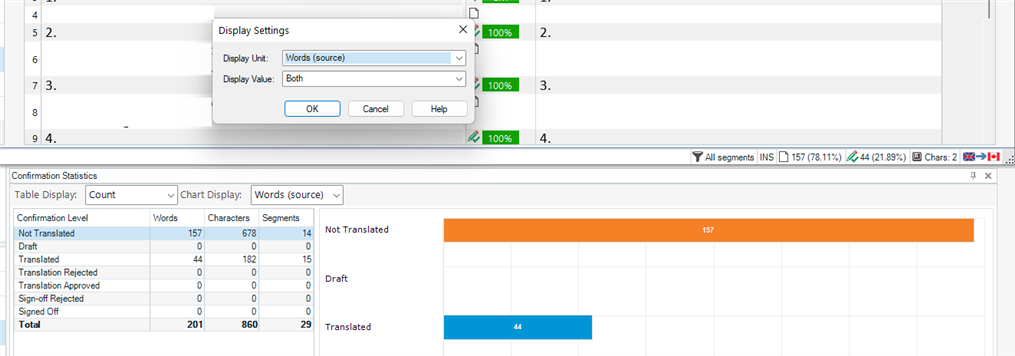
    I selected "Words (source)" not segments to show in both Display settings and in Confirmation statistics.

    Why the Files screen shows a statistic based upon segments?

    Can I get back to see this statistic based upon words?

    Thanks

    Trados Studio display settings window showing 'Words (source)' selected with 'Both' display value.

    Confirmation statistics in Trados Studio with a chart displaying word count for 'Not Translated' and 'Translated'.

    emoji


    Generated Image Alt-Text
    [edited by: Trados AI at 8:32 AM (GMT 0) on 29 Feb 2024]
Children
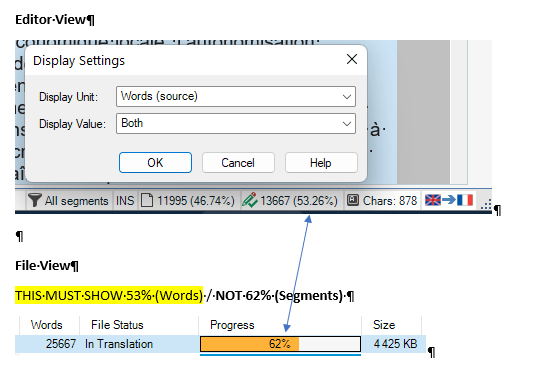
  • Can we get a reversal of this situation (back to Studio 2021 and older) and be sure that what we chose to see in Trados Studio 2022 - 17.0.3.11695 is what we see in the Editor view is the same as in Files view (% of words and NOT % of segments) 

    Trados Studio Editor view with Display Settings dialog box open, showing 'Words (source)' selected and progress percentages for segments and characters.

    emoji


    Generated Image Alt-Text
    [edited by: Trados AI at 8:32 AM (GMT 0) on 29 Feb 2024]
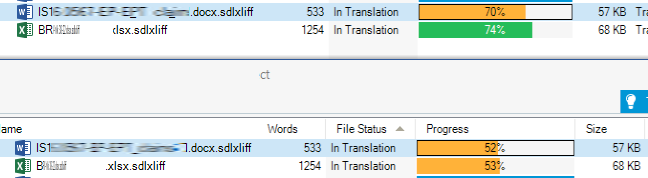
  • This discrepancy is extremely annoying as I relate to the Files screen to plan my current work and when a project on this screen shows 75% completed (by segments) when it is actually less than 52% (by words) in reality in the Editor, I am way off in my planning.

    I am being paid as everybody else by words, not by segments.

    NOTE: The new Manager (beta) screen has the same problem?

    Please, bring back ASAP a meaningful indicator for measuring progress 

    emoji
  • I am actually forced to open a session with Trados 2021 to follow my progress with the Confirmation statistics indicator I need, as you can see below in the screenshot (Studio 2002 is on the top and shows much progress which is not true).

    How stupid is that?

    Screenshot of Trados Studio 2021 showing two files in translation with incorrect progress percentages. Top file shows 70% but should be 52%, bottom file shows 74% but should be 53%.

    emoji


    Generated Image Alt-Text
    [edited by: Trados AI at 8:32 AM (GMT 0) on 29 Feb 2024]