 Translate


Hello,
I'm a translator working with Trados Studio 2021 SR2 - 16.2.12.9338 and


Hello,
I'm a translator working with Trados Studio 2021 SR2 - 16.2.12.9338 and GS 2020 SR1 CU04.
At our place of work, we have Office 365. Everything is completely up to date.
A while ago, Microsoft Word Spell Check stopped working in Studio. Only for me - my colleagues with the exact same set-up, do not have this problem.
When I try to select Microsoft Word Spell Check instead of Hunspell, I get this error message:
"Unable to select spell checker extension.
Unable to locate if Microsoft Word is installed on this machine."
The spell check works just fine in Word!
Can you help me resolve this issue?
Thanks!
Kind regards,
Emma


I also have the same problem as Emma Maris. I'm running Office 365 and Trados Studio 2022 17.0.0.11594. First noticed a couple of weeks ago.
I don't want to wipe all my macros from my normal.dotm file, so I can't try the first workaround Sorin Dolha suggested. The second one, (clicking "disable macros" when the pop-up warning appears) means I can use MS spellchecker in Trados, but I still can't add new words to my custom dictionary.
Looking forward to a fix for this frustrating problem!
I also have the same problem as Emma Maris. I'm running Office 365 and Trados Studio 2022 17.0.0.11594. First noticed a couple of weeks ago.
I don't want to wipe all my macros from my normal.dotm file, so I can't try the first workaround Sorin Dolha suggested. The second one, (clicking "disable macros" when the pop-up warning appears) means I can use MS spellchecker in Trados, but I still can't add new words to my custom dictionary.
Looking forward to a fix for this frustrating problem!

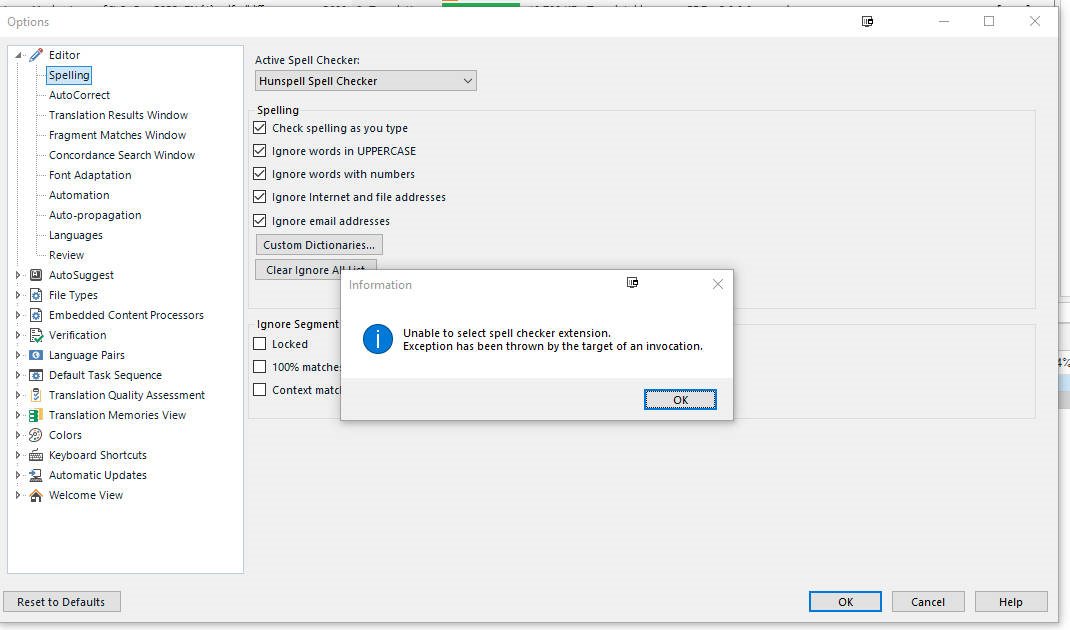 Unfortnately, after a recent office update I became a victim of the same issue, and Hunspell is terrible with Arabic indeed. That is a very crippling issue indeed.
I deleted the Normal.dot template and word recreated it from scratch, and I was after a while able to add the word spell checker to my 2022 Studio, but not the 2022 Beta, which is really very very strange! One thing you can also try is to open any document, go to options, proofreading, then choose to Recheck Spelling in that document, and somehow it does something to the spell checker that would allow it to work. I will just have to restart my PC now to verify if this is resolved for good or not.


Hunspell is terrible. Period. I now work without my beloved macros in order to be able to use Word spellcheck.
One reason not to use Hunspell is that customers require me to do a spellcheck before delivery, and if they afterwards find something with Word spellcheck that was not detected by Hunspell, I cannot tell them I use substandard Hunspell because Trados does not manage with Word spellcheck...
