 Translate


Hello,
I'm a translator working with Trados Studio 2021 SR2 - 16.2.12.9338 and


Hello,
I'm a translator working with Trados Studio 2021 SR2 - 16.2.12.9338 and GS 2020 SR1 CU04.
At our place of work, we have Office 365. Everything is completely up to date.
A while ago, Microsoft Word Spell Check stopped working in Studio. Only for me - my colleagues with the exact same set-up, do not have this problem.
When I try to select Microsoft Word Spell Check instead of Hunspell, I get this error message:
"Unable to select spell checker extension.
Unable to locate if Microsoft Word is installed on this machine."
The spell check works just fine in Word!
Can you help me resolve this issue?
Thanks!
Kind regards,
Emma


Hey Emma Maris
Its likely to be related to admin rights when making your selection
We have an article about this: https://gateway.rws.com/csm?id=kb_article_view&sysparm_article=KB0028362
Please let me know if it resolved your reported concern
Lyds
Oana Nagy | QA Engineer | RWS Group


Hi Lydia,
Thanks for your suggestion! I've just tried this, but the problem persists :(
I get a message saying that Microsoft Office has detected a potential security problem and has blocked macros as it does not trust the source file :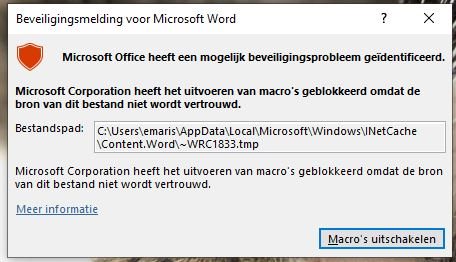
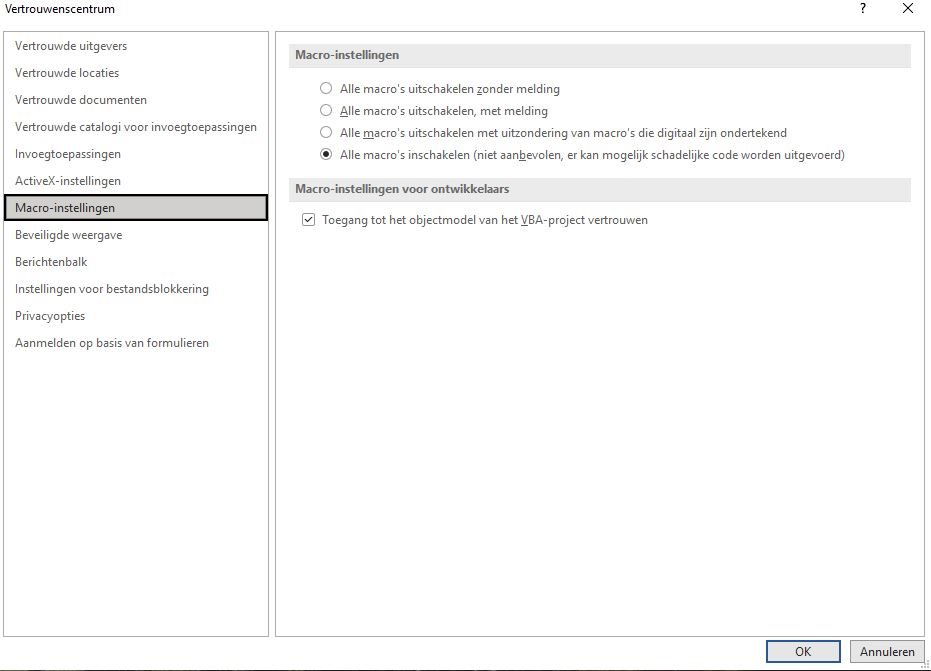
However, in the trust centre in Word, I've accepted all macros ... :| beats me!
Any other suggestions?
Thanks in advance!
Kind regards,
Emma
Hi Lydia,
Thanks for your suggestion! I've just tried this, but the problem persists :(
I get a message saying that Microsoft Office has detected a potential security problem and has blocked macros as it does not trust the source file :
However, in the trust centre in Word, I've accepted all macros ... :| beats me!
Any other suggestions?
Thanks in advance!
Kind regards,
Emma
Here selecting all macros as allowed solved the issue. There was also an attempt to place the temp folder used by Trados as a trusted location to avoid having to accept all macros, but that failed due to a Word error message describing it as not an allowed trusted location. This seems to indicate that the correct solution would be for Trados to place any temporary files in needs to use the Word spell checker in a folder that can be added as a trusted location in the Trust Center.

Jere Hakanen Happy that this worked for you! Sadly this did not resolve it for me. SDL Support also suggested making the temp folder a trusted location, but Word gave me the same error message. I'm contacting my IT department to see if they can work around that ... But as you said, maybe Trados can look into it!
Hi Lydia Simplicio (lsimplicio),
In the end our IT department gave me a new laptop on which they first installed MS Office, then Studio. This resolved the issue.
Last night, my laptop did some updates. Result: the same error message ...
Does this shine a light on the origin and possible solution of the issue?
Thanks again,
Kind regards,
Emma
