 Translate


Hello,
I'm a translator working with Trados Studio 2021 SR2 - 16.2.12.9338 and


Hello,
I'm a translator working with Trados Studio 2021 SR2 - 16.2.12.9338 and GS 2020 SR1 CU04.
At our place of work, we have Office 365. Everything is completely up to date.
A while ago, Microsoft Word Spell Check stopped working in Studio. Only for me - my colleagues with the exact same set-up, do not have this problem.
When I try to select Microsoft Word Spell Check instead of Hunspell, I get this error message:
"Unable to select spell checker extension.
Unable to locate if Microsoft Word is installed on this machine."
The spell check works just fine in Word!
Can you help me resolve this issue?
Thanks!
Kind regards,
Emma


The same. I think this applies to everybody using Word Spell Checker.
It started yesterday with the new stricter Microsoft policies: https://docs.microsoft.com/en-us/deployoffice/security/internet-macros-blocked
The location C:\Users\[USER]\AppData\Local\Microsoft\Windows\INetCache\Content.Word cannot be made trusted, as it's internet cache (quite legit).


The same. I think this applies to everybody using Word Spell Checker.
We would see a big wave of complaints here if this were impacting all Studio users.
FYI: We do not face this issue at all (about 20 Studio users), it must therefore be linked to some special configuration/environment and I hope for you that someone will find the cause of this.
Please note that this requires the newest Office update + using of Word Spell checker.
Many translators may use Hunspell, but unfortunately, it does not work with Finnish. I just heard that MemoQ support team has flood of this request, too, so I don't believe that this is a marginal issue.

I wonder what makes MS Word Spell Checker stand out so much that people keep using it in spite of all the problems that have been besetting this plugin for years now. For French, Antidote seems to be a very powerful tool, I am using LanguageTool for German and English - are there not enough alternatives like that?

One advantage of using Word SpellChecker is that words you add to the custom dictionary are also available when spellchecking the target document in Word, so that you don't need to add them again.
You say that you are using Language Tool, but how does this integrate into Studio?
Hunspell cannot handle Finnish.

Jussi Rosti
Hi guys. Thanks for your input. Whereas I'd be interested to learn about other and possibly more powerful tools that integrate into Studio, this discussion does not help us solve the issue at hand.
At the time of writing this reaction, 377 people have suscribed to this thread. That does go to show that this is not an isolated issue. I'd be very grateful if some from Trados Studio could look into this.
LanguageTool: There is a plugin. I run LT on my own machine, but you can use the cloud version either on the free or the paid tier as well.
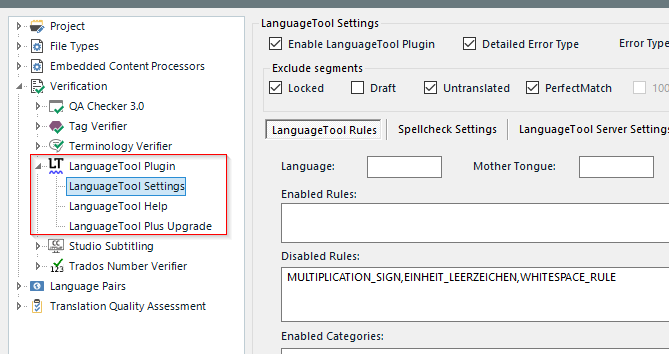
I am still on Studio 2021 - don't know whether Dariusz Adamczak is still maintaining it? It adds a lot of value for me, that's for sure. Can't find it on the AppStore at the moment, but that AppStore is going through troubled times, it seems...
Daniel

I finally found it in the integrated AppStore of Studio 2022. One has to enter LanguageTool in one word as search term and not as two words.
I installed it, but then did not find the settings in Studio. Did not know one had to look under 'Options - Verification'. Thanks for showing me this.
The link to the Getting Started PDF on the LT website does not work, so it was of no help at all.
I'll install this locally and see how it works. Thanks Daniel.

I finally found it in the integrated AppStore of Studio 2022. One has to enter LanguageTool in one word as search term and not as two words.
I installed it, but then did not find the settings in Studio. Did not know one had to look under 'Options - Verification'. Thanks for showing me this.
The link to the Getting Started PDF on the LT website does not work, so it was of no help at all.
I'll install this locally and see how it works. Thanks Daniel.
This is the developer's website: https://www.posteditacat.xyz/en/downloads/
I doubt the UI changed a lot between the version for 2021 and 2022.
Setting up the LT server on your machine is not rocket science, but connecting to the free web service is easier, if you just want to give it a test ride.
Daniel
(Relieved that this is still being supported and developed, thank you Dariusz!)