You are currently working on UAT 

Disable "clever"/crap dysfunctionality

Is there any way to turn off ALL "clever" add-ons and tweaks and nonsense which the designers have very unfortunately felt they should add to this 2019 edition?  I want to turn them off completely, get rid of them, destroy them, disable them totally.

Parents
  • There are about 300 aspects of SDL 2019 which make it unfit for the description "software" or "software application", let alone one which anyone should ever be expected to pay money for.

    I'm already relishing the next 297!

    One aspect I have noticed (a new feature in 2019 it would appear), is that it tries to be "clever" in ways which are a most unfortunate design choice. I have noticed that sometimes, if it spots that a segment is pretty much identical to one in memory it will actually now insert stuff, "scraped" from the new source segment, into the proposed translation.

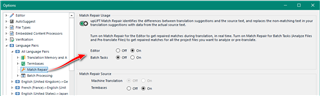
    I guess you're referring to Match Repair?  Just turn it off or even use the original match:

    Trados Studio settings window showing Match Repair option with a red arrow pointing to the toggle switch set to 'On'.

    Quite apart from the fact, of course, that an application with even a slight hint of professional development behind it would be looking up, in a different thread, the matches for the next few segments (S+1, S+2, S+3...) after segment S even as the user is in the process of translating segment S. But, duh, never occurred to them I spose!!! ;-(

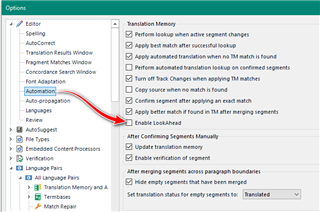
    Turn it off...

    Options menu in Trados Studio with a red arrow indicating the Match Repair section, highlighting various settings including 'Enable LookAhead'.

    PS re the "Tags" box below.  Is any mod or administrator of this forum aware that clicking in this box actually makes the screen with all the description disappear, thus losing all one's description if one hasn't copied to clipboard (I had)?  I use Firefox 70 x64 with various add-ons including Adblock Ultimate.  This shouldn't be happening.  Presumably this forum is run by SDL itself. True to form... !

    Nice!  You are a real pleasure to try and help.

    I suggest you do two things:

    1. Take a good look at your computer. I don't care how powerful you think it is but you definitely have something installed that is affecting it's ability to work more efficiently.  Studio isn't perfect by any means, but the war and peace you make out of every problem you come across is hardly reflective of the experience of the majority of our users.
    2. Take a good look at the manual... tutorials... learn how to use a tool properly if you are going to use it at all.

    Paul Filkin | RWS

    Design your own training!
    You've done the courses and still need to go a little further, or still not clear? 
    Tell us what you need in our Community Solutions Hub

    emoji


    Generated Image Alt-Text
    [edited by: Trados AI at 7:13 PM (GMT 0) on 28 Feb 2024]
  • Thanks Paul.

    My view that SDL is unspeakably dreadful as an application is pretty well-informed. It's really in a class of its own, and I've felt that way ever since I had the misfortune to encounter Trados of the old style about 20 years ago.

    I'm now developing my own FOSS app which will do pretty much everything SDL does, and given time it'll be able to do much more and better. Just to give you a couple of examples: it is absolutely unbelievable that, given that SDL and Trados have been around so long, and have been raking in so much money year after year after decade after decade, not just from users but from most "corporate" translation companies...

    - 1. concordance searching still does not work using Lucene indices, using stemming and so forth (see Apache Lucene).  It also appears that Lucene indexing is not used for fuzzy matching either.

    - 2. that even now I am obliged to use the mouse for mnemonic menus which just don't work: I can't give you an example right now because I'm booted into Linux. But I'm referring to menus where it *appears* you are able to go Alt-N (or whatever) and then follow on exclusively with the keyboard... and these simply don't work - for many commands I'm actually *obliged* to use the mouse, a bit: a sure sign of amateurish app development.

    - 3. that even now after all these years you still, as a user, get error failure messages which should never be presented to the user but instead logged for technical analysis (e.g. things like "Object is not referenced as an object" ...)

    - 4. SDL software, all of it, is what I refer to as "legacy code". By that I mean code that has not been developed exclusively using Test-Driven Development. It is unthinkable that properly tested code would ever have led to a Service Pack (about a year ago) in which regex Search-and-Replace was inadvertently hobbled.

    Re FOSS CAT tools: it's a great shame about Omega T (e.g. still seemingly not being able to handle things like markup at all adequately, and still having an unacceptably clunky UI).  From my testing of it Omega T is also unable to handle  gigantic TMs, of the kind I use.

    Re Linux/Windoze.  I despise Windoze pretty much on a par with SDL.  There are only two apps now keeping me on the Dark Side: SDL and Dragon Dictation software.  For this reason I only boot to 'Doze when I'm doing translations.

    For example, there's no reason why SDL couldn't offer Linux versions as well as 'Doze. They offer a Mac version, and Mac OS has obviously been (in my opinion) leeching off Linux since its inception.

    Re SDL manuals. I have in the past tried to look at what passes for the SDL manuals, online somewhere. I found them to be as appalling badly put together as the application itself: virtually unreadable, obviously not designed by anyone with adequate technical writing skills. The entire organisation is amateurish from top to bottom.

  • My view that SDL is unspeakably dreadful as an application is pretty well-informed. It's really in a class of its own, and I've felt that way ever since I had the misfortune to encounter Trados of the old style about 20 years ago.

    Of course you're entitled to your opinion. But if you really came here for help, or to share your wisdom on what could be done better, perhaps you could try and stick to just that and not fill the thread with so much opinionated negative commentary.  It's hard to pull out the value in your criticism, and I'm sure there is some in there, when you don't.

    Paul Filkin | RWS

    Design your own training!
    You've done the courses and still need to go a little further, or still not clear? 
    Tell us what you need in our Community Solutions Hub

  • Yes, I have quite a bit of coding knowledge. I have developed my own Lucene index applications for example.  People without coding knowledge are perhaps more likely than I to be impressed by what CAT Translation Memory tools are doing.  It ain't really rocket science: Levenshtein distances, all that mullarkey.

    No doubt some people will claim that neural networks are involved.  I very much doubt that SDL 2019 really uses advanced things like that in any real sense of the term. 

    I (obviously) don't know how familiar you are with Lucene indices (aka reverse indices)... they actually provide functionality which is more than powerful enough for TM apps.

  • No doubt some people will claim that neural networks are involved.

    Where?

    Yes, I have quite a bit of coding knowledge. I have developed my own Lucene index applications for example. 

    Well, I'll look forward to the day you finish your new and improved toolset so I can see just how well things could work.

    Paul Filkin | RWS

    Design your own training!
    You've done the courses and still need to go a little further, or still not clear? 
    Tell us what you need in our Community Solutions Hub

Reply Children
  • Hahaha.  Don't worry, it'll be FOSS.

    Just let me ask you this: I do a lot of French legal contracts.  Very often French lawyers have a habit of capitalising certain terms in such documents: "La Partie qui dépose... ", "Le Bénéficiaire s'addressera au Vendeur ... ". Often these terms are repeated tens, even hundreds, of times in a given document. It's a right pain having to capitalise each English occurrence in the target.

    So I've developed a little app which analyses the Word document for sequences and frequencies (there are Java classes which can analyse Word documents into paragraphs, words, etc.).  If it finds that the word "Bénéficiaire" crops up 100 times, with that capitalisation, the best thing is then not to bother with capitalising each instance , but to capitalise globally at the end.  My app mentions the number of lower-case ocurrences, which I can then search for if there are, say, only a couple in the whole document.

    I go further: why bother even translating the word Bénéficiaire? Just leave it in the target until the very end of the job.  Then search-and-replace.

    If SDL were FOSS someone somewhere would have had such thoughts, and a "case-sensitive sequence-matching"  function would have been built in years ago, to provide an analysis of things which will make your productivity (and consistency) better. 

    Of course you can use such techniques on-the-fly, without prior analysis: I see this word "Vendeur" near the start of a document and assume it is going to crop up hundreds of times, with different casing variants, so I just leave it in the French until the end. Maybe many people already do this. But proper sequence analysis is better.

    PS google | SDL "neural networks" |. There are tons of claims along these lines, e.g. www.sdl.com/.../what-linguistic-AI-has-learned.html