You are currently working on UAT 

[SDLXLIFF Converter for Microsoft Office] Error

Former Member
Former Member

I am not sure but this should be the right place to post this one.

Yesterday, I've heard VERY interesting functionality of my OLD version 2017 Trados Studio machine.
"SDLXLIFF Converter for Microsoft Office"
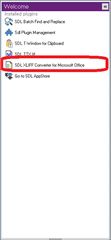
Trados Studio welcome screen with 'SDLXLIFF Converter for Microsoft Office' plugin highlighted in red.

so, tried like a crazy man
but, failed, totally
I am going to blame SDL
this is too too too hard to use from my side
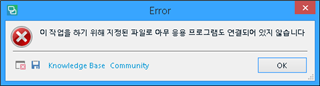
Error message dialog box in Trados Studio with a red 'X' icon indicating a problem.
means.. "You need to "designate" file and "link" application.

This is not the only one.
All of them, 5 of them show me the SAME errors.
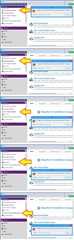
Trados Studio error logs showing multiple error entries with yellow warning icons and red error icons.

- I do not know any kind of the root reason of these errors (this error), so "naturally" selected the most idiot way "Deleted Whole SDL Trados Studio 2017 and ReInstall It"
- Wow, yes, that is the most stupid choice, because my result was FAIL.
- now I used system mirrored file and make it all the systme just like yesterday, God Thanks.. 
- spent precious several Hours... why ?

I am still want to use the "SDLXLIFF Converter for Microsoft Office" functionality but..
99.99% exhausted.

Regards


Generated Image Alt-Text
[edited by: Trados AI at 7:27 PM (GMT 0) on 28 Feb 2024]

emoji
Parents Reply
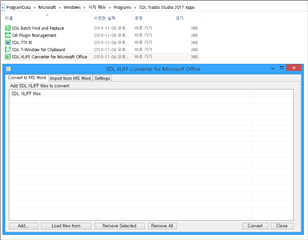
  • ok... can you open the apps from this location:

    C:\ProgramData\Microsoft\Windows\Start Menu\Programs\SDL Trados Studio 2017 Apps

    If you can open the apps from there, please rename the whole folder (the one above) and then run a repair of Studio and try to start the apps again.

    If the shortcuts from the folder location don’t work … they’re most likely incorrectly installed on your end.  If you log a Case (and specify all of these things we recommended above) then someone in the Support team will have a remote session with you and help you get this fixed.

    You can log the case from here:

    gateway.sdl.com/liveagentlicensing

    You have two options:

    1. Submit a case using a webform
    2. Use live chat to get a licence reset

    You want to use the first option and make sure that you refer to this thread so the teams can see what you have tried already.

    Paul Filkin | RWS

    Design your own training!
    You've done the courses and still need to go a little further, or still not clear? 
    Tell us what you need in our Community Solutions Hub

Children