You are currently working on UAT 

Unable generating target translation using Trados 2019 SR1 and SR1 with PDF files

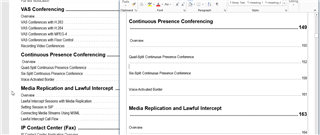
Failed repeatedly when generating target translation files both with Trados 2019 SR1 and SR2.  The error message indicates "illustration<shapename=xxxxx[number]> was moved between paragraphs".  Then I located the specific tag that contains the erroneous shapename, even copied the source segment to the target segment, and tried both the "batch task>generate target translation" option AND the "save target as option", but none worked. The same error still persists.  The file type I am working on is PDF. Yet there you see the same error message even when you attempted to save the targe translation with an Office docx/rtf format which been converted from PDF through Trados from the outset. These are product manuals that embedded with tons of graphs, tables, and figures, a huge wok of tags in the Trados interface.  This problem is really really really annoying and I would truly be thankful to anyone who has an effective remedy!!!

Parents
  • Hello ,

    Working with PDF files is always a problematic task- especially if the PDF is not the original and /or as you say-

    These are product manuals that embedded with tons of graphs, tables, and figures, a huge wok of tags in the Trados interfac

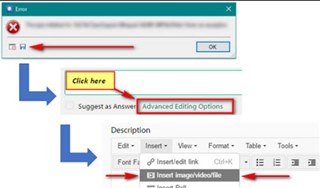
    When you receive error messages, it is best advised that you post the full error stack (thus giving us as much info to work on as possible)

    Error dialog box with an 'OK' button, and a Trados Studio interface showing 'Click here' and 'Advanced Editing Options' highlighted in red.

    Please also read the following Community Wiki on handling PDF's and ensure you have the correct plugins (IRIS and TransTools) installed-

    https://community.sdl.com/product-groups/translationproductivity/w/customer-experience/3182/how-to-work-with-a-pdf-file

    With complicated PDF files, its often advisable to do all the DTP/formatting outside of Studio- which can however be time intensive.

    Its also worth asking the client if they still have the original document which will normally be either Word or Indesign- which will make the process so much easier for you.

    Oana Nagy | QA Engineer | RWS Group

    emoji


    Generated Image Alt-Text
    [edited by: Trados AI at 7:03 PM (GMT 0) on 28 Feb 2024]
  • Dear Steven,

        First, many thanks for your kind and timely response. However, the solution you suggested did not work.  I applied the IRIS tool to generate a Word Docx file based on the PDF file I received, which I then cleaned with Document Cleaner for the tags. But in the end, I still wasn't able to produce a target translation. There was always a dialog box showing   "illustration<shapename=xxxxx[number]> was moved between paragraphs" like before, which I guess is the reason that caused this problem. If it is convenient for you, could you please kindly leave an email address or any access through which  I could provide you with the Trados file and the error report so that you can help me to carry a more professional analysis with this issue? I am in a really desperate situation, having had tried every possible method I could think of without success...

Reply
  • Dear Steven,

        First, many thanks for your kind and timely response. However, the solution you suggested did not work.  I applied the IRIS tool to generate a Word Docx file based on the PDF file I received, which I then cleaned with Document Cleaner for the tags. But in the end, I still wasn't able to produce a target translation. There was always a dialog box showing   "illustration<shapename=xxxxx[number]> was moved between paragraphs" like before, which I guess is the reason that caused this problem. If it is convenient for you, could you please kindly leave an email address or any access through which  I could provide you with the Trados file and the error report so that you can help me to carry a more professional analysis with this issue? I am in a really desperate situation, having had tried every possible method I could think of without success...

Children