You are currently working on UAT 

Term base problem

Hello,

When I am translating with SDL Trados Studio 2019, the following message frequently appears (I use the program in French):
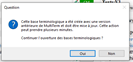
Error message in SDL Trados Studio 2019 in French, asking if the user wants to continue the operation of term recognition.

When I click "oui" I am taken back to my translation, but the term base no longer works!

 I have to close and reopen Studio in order to get the terms coming through again.

Any ideas as to what's going wrong?

Thanks in advance!


Generated Image Alt-Text
[edited by: Trados AI at 6:45 PM (GMT 0) on 28 Feb 2024]

emoji
Parents
  • Hello  ,

    Unfortunately the screen shot is far to small to read- Maybe you can repost a new larger one.

    When problems between Termbase and Studio occur- the following solutions resolve most cases easily and qquickly

    1) Ensure both Studio and MultiTerm are both upto date and on the latest stand.

    2) Resetting Windows layout-

    Trados Studio screenshot showing the 'Reset Window Layout' option highlighted in the 'View' tab.

    Now close Studio- reboot your machine and restart Studio.

    Oana Nagy | QA Engineer | RWS Group

    emoji


    Generated Image Alt-Text
    [edited by: Trados AI at 6:46 PM (GMT 0) on 28 Feb 2024]
  • Hi Steven,

    Thanks for your reply, I couldn't resize the printscreen on here... Posting what seems to be a larger version on my end, but I will just type it out as well:

    Trados Studio error message in French stating the terminology database was created with an older version of MultiTerm and needs to be updated, with options to continue or not.

    "Cette base terminologique a été créée avec une version antérieure de MultiTerme et doit être mise à jour. Cette action peut prendre plusieurs minutes.

    Continuer l'ouverture des bases terminologiques ?"

    I have reset the layout in Studio but not sure that will change anything, the term recognition window was already there, just showing no results... Will keep working with it and see what happens!

    What do you mean by "on the latest stand"? As far as I know both programs are up to date... I'm using 2019 versions.

    Thanks!

    emoji


    Generated Image Alt-Text
    [edited by: Trados AI at 6:46 PM (GMT 0) on 28 Feb 2024]
Reply
  • Hi Steven,

    Thanks for your reply, I couldn't resize the printscreen on here... Posting what seems to be a larger version on my end, but I will just type it out as well:

    Trados Studio error message in French stating the terminology database was created with an older version of MultiTerm and needs to be updated, with options to continue or not.

    "Cette base terminologique a été créée avec une version antérieure de MultiTerme et doit être mise à jour. Cette action peut prendre plusieurs minutes.

    Continuer l'ouverture des bases terminologiques ?"

    I have reset the layout in Studio but not sure that will change anything, the term recognition window was already there, just showing no results... Will keep working with it and see what happens!

    What do you mean by "on the latest stand"? As far as I know both programs are up to date... I'm using 2019 versions.

    Thanks!

    emoji


    Generated Image Alt-Text
    [edited by: Trados AI at 6:46 PM (GMT 0) on 28 Feb 2024]
Children