You are currently working on UAT 

SDL Studio 2019 error message while starting

Hi everyone,

I have been using Trados Studio for a number of years and the current version in Use is SDL Trados Studio 2019.

Today, whilt attempting to start the studio I got the following error message:
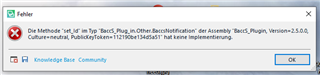
Error message window on Trados Studio stating 'The method 'set_UI' for 'Tag' type in 'TagEditorPlugin' for assembly 'Trados, Version=2.5.0.4, Culture=neutral, PublicKeyToken=1f1e7a1d8e4551df' has not been implemented.' with an OK button.

Thereafter nothing happens. 

Can someone please help in overcoming this problem please?

Thanks for your support in advance

Best regards

Shyam Gupta


Generated Image Alt-Text
[edited by: Trados AI at 6:44 PM (GMT 0) on 28 Feb 2024]

emoji
Parents Reply
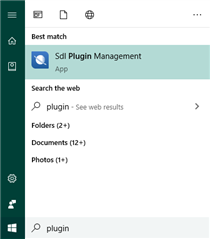
  • You have two options.  Try pressing the Win key to activate the Run entry and type "plugin", you should see something like tihis:

    Windows search results showing 'Sdl Plugin Management' app as the best match for the search term 'plugin'.

    Then run it.

    If you don't manage to to do that then simply manually remove the BaccS plugin from your computer by removing the plugin from all of these locations, if it’s in there:

    c:\Users\[USERNAME]\AppData\Roaming\SDL\SDL Trados Studio\15\Plugins\Packages\
    c:\Users\[USERNAME]\AppData\Roaming\SDL\SDL Trados Studio\15\Plugins\Unpacked\
    c:\Users\[USERNAME]\AppData\Local\SDL\SDL Trados Studio\15\Plugins\Packages\
    c:\Users\[USERNAME]\AppData\Local\SDL\SDL Trados Studio\15\Plugins\Unpacked\
    c:\ProgramData\SDL\SDL Trados Studio\15\Plugins\Packages\
    c:\ProgramData\SDL\SDL Trados Studio\15\Plugins\Unpacked\

    Paul Filkin | RWS

    Design your own training!
    You've done the courses and still need to go a little further, or still not clear? 
    Tell us what you need in our Community Solutions Hub

    emoji


    Generated Image Alt-Text
    [edited by: Trados AI at 6:44 PM (GMT 0) on 28 Feb 2024]
Children