You are currently working on UAT 

MemoQ overrules Studio

Hi,

For one of my cliensts I have to use MemoQ. But one thing is very annoying: MemoQ assumes it comes first, ie all icons are replaced and it is tried to open projects in MemoQ. I do not know how to get rid of this. So once I have finished a translation I uninstall MemoQ and reinstall it the next time. Very annoying! Does anyone among you has similar problems and can suggest a solution? Today I will also write to MemoQ Support.

Thanks for your help!

Ingrid

Parents Reply
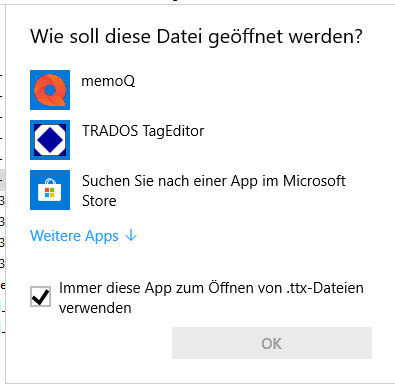
  • You can simply right click the corresponding file, say "Open with" (Öffnen mit), then say "Chose another app" (Andere App auswählen), chose the proper application from the list and tick the box "Always use this app..." (Immer diese App zum Öffnen...):

    Open with dialog box showing options including memoQ, TRADOS TagEditor, and a search option for apps in the Microsoft Store. Checkbox for 'Always use this app to open .ttx files' is ticked.

    This should change the behavior in the desired way. Otherwise you also can change the standard apps via Windows settings.

    _________________________________________________________

    When asking for help here, please be as accurate as possible. Please always remember to give the exact version of product used and all possible error messages received. The better you describe your problem, the better help you will get.

    Want to learn more about Trados Studio? Visit the Community Hub. Have a good idea to make Trados Studio better? Publish it here.

    emoji


    Generated Image Alt-Text
    [edited by: Trados AI at 6:34 PM (GMT 0) on 28 Feb 2024]
Children