You are currently working on UAT 

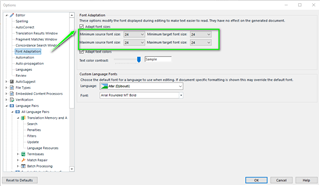
Enlarge font size in Files and Project panes and in all dialogues in general?

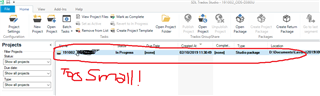
I have not been able to find a way to enlarge the font size in the Files and Project panes.

At the moment, file names and project names are near illegible.

I don’t mind rummaging in some hidden setting files, but I need to be able to actually READ what those windows say.

Is there a way?

Could SDL make a patch for visually-challenged translators?

I can’t believe that accessibility is so low a priority.

Lorenzo (frustrated)

Parents Reply
  • Studio does support scaling very well.

    Could be. I'm not perfectly informed about the latest status... My understanding is that scaling is not perfectly supported throughout the entire application, i.e. that mostly it should work fine, but not absolutely everywhere and absolutely 100% (otherwise this KB article would not still apply: gateway.sdl.com/.../communityknowledge

    With 100% scale I see many more - and this is really what's needed. At home I have 2 27" screens for working. In a train there is just the 12,3" screen of my Surface - and I have to see the same... So scaling has more drawbacks for me than positive effects.

    Well, but that's not really the scaling's fault...

    It's a problem of the extremely stupid idea to put (x)hdpi displays in miniature devices in the first place! That's something I'm pointing out for years...
    Doing that does not make absolutely any sense. And buying such devices either... for these very reasons.

    And the second problem is that the application should provide a minimalistic GUI layout for such cases, without unneeded clutter on the screen.
    Just like e.g. Word provides the Reading layout...

    So, to sum up, the proper solution is NOT having zillions of options to set size/font/whatever of every possible GUI component... the proper solution is to provide layout suitable for stupidly miniature screens mobile devices.
    Now, ask the SDL product management into which segment they position Studio - whether into desktop segment, or mobile segment.... I'm pretty positive you know the answer... And that means that a properly sized display is expected for using Studio.
    In other words, if you use Studio in an 'unexpected' way, you're on your own...

Children
No Data