You are currently working on UAT 

Enlarge font size in Files and Project panes and in all dialogues in general?

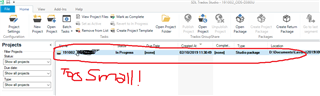
I have not been able to find a way to enlarge the font size in the Files and Project panes.

At the moment, file names and project names are near illegible.

I don’t mind rummaging in some hidden setting files, but I need to be able to actually READ what those windows say.

Is there a way?

Could SDL make a patch for visually-challenged translators?

I can’t believe that accessibility is so low a priority.

Lorenzo (frustrated)

Parents Reply Children
  • Thanks for trying, but of course it does NOT help.

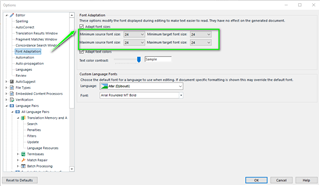
    I have already changed the size of the fonts inside the EDITOR. I need to change the size of the font in Files and Project panes.

    And while I could change the scaling of my entire Windows environment, I only want to change the size of the fonts in the Files and Project panes. The letters are 2 mm high.

    Screenshot of Trados Studio with the Projects pane open, showing a project list with very small font size, making it hard to read. Text 'Too Small!!' is handwritten on the image.

    emoji


    Generated Image Alt-Text
    [edited by: Trados AI at 6:34 PM (GMT 0) on 28 Feb 2024]
  • Hello ,

    Unfortunately it is not possible to increase the size of the text in these panes.

    If you only work with maybe a laptop- maybe using a second larger screen would help you?

    Oana Nagy | QA Engineer | RWS Group

  • Dear Steven,

    thank you for getting back to me and confirming that Studio does not provide that option.

    I was wondering, would making Studio more inclusive and accessible be one of the development target for the near future?

    I am certain that many translators like me are no longer spring chickens and their vision is no longer what it was.

    I suspect it would not require a huge development cost to whip out a patch to enlarge font sizes and make it available. Think about all the kudos and good will you’d get! "SDL thinks about sight-challenged translators", the headlines would read.

    All the best

    Lorenzo

  • Using larger screens is not the solution. In fact we are in the 21st century with laptops and computer screens having a much better resolution than just "Full HD". For example I am using a Microsoft Surface Pro LTE with a 12,3" screen and a resolution of 2736x1824 pixel. While working with Studio is still possible there, as I can increase the font in editor and some other parts in Studio, changing settings without a magnifying glass is a pain somewhere. So I fully support the request of having the possibility to chose a bigger font for Studio GUI. And please do not force us to use Windows scaling - this is not a solution. I am not buying a Ferrari for driving 200 m to the next grocery store...

    _________________________________________________________

    When asking for help here, please be as accurate as possible. Please always remember to give the exact version of product used and all possible error messages received. The better you describe your problem, the better help you will get.

    Want to learn more about Trados Studio? Visit the Community Hub. Have a good idea to make Trados Studio better? Publish it here.

  • Precisely my feelings Jerzy!

    I put up with it for years (I seem to remember I had a conversation with Paul Filkin about it with Studio 2009 or 11), but yesterday i got really frustrated.  I worked for a number of hours on an obsolete version of a project because I could not ACTUALLY SEE that its name had a number 6 and not an 8 .

    It shows its legacy, when VGA resolutions were common.

    But I think that all the bells and whistles, all the power "under the bonnet" are not very helpful if you cannot see where to turn them on.

  • And please do not force us to use Windows scaling - this is not a solution.

    Hmmm, I dare to disagree here - the generic OS-level GUI controls scaling is the intended solution, AFAIK.
    But the application has to fully support it, of course... which is still not the Studio's case, I believe.

  • Hmmm, I dare to disagree here - the generic OS-level GUI controls scaling is the intended solution, AFAIK.
    But the application has to fully support it, of course... which is still not the Studio's case, I believe.

    Studio does support scaling very well. But when I use scaling, ALL elements not connected with current work are enlarged. I have to minimize ribbon, but still the title bars and the GUI elements take a lot of space I can otherwise utilize for placing extra elements. When I scale up, I can see just few segments in editor for context. With 100% scale I see many more - and this is really what's needed. At home I have 2 27" screens for working. In a train there is just the 12,3" screen of my Surface - and I have to see the same... So scaling has more drawbacks for me than positive effects.

    _________________________________________________________

    When asking for help here, please be as accurate as possible. Please always remember to give the exact version of product used and all possible error messages received. The better you describe your problem, the better help you will get.

    Want to learn more about Trados Studio? Visit the Community Hub. Have a good idea to make Trados Studio better? Publish it here.

  • Studio does support scaling very well.

    Could be. I'm not perfectly informed about the latest status... My understanding is that scaling is not perfectly supported throughout the entire application, i.e. that mostly it should work fine, but not absolutely everywhere and absolutely 100% (otherwise this KB article would not still apply: gateway.sdl.com/.../communityknowledge

    With 100% scale I see many more - and this is really what's needed. At home I have 2 27" screens for working. In a train there is just the 12,3" screen of my Surface - and I have to see the same... So scaling has more drawbacks for me than positive effects.

    Well, but that's not really the scaling's fault...

    It's a problem of the extremely stupid idea to put (x)hdpi displays in miniature devices in the first place! That's something I'm pointing out for years...
    Doing that does not make absolutely any sense. And buying such devices either... for these very reasons.

    And the second problem is that the application should provide a minimalistic GUI layout for such cases, without unneeded clutter on the screen.
    Just like e.g. Word provides the Reading layout...

    So, to sum up, the proper solution is NOT having zillions of options to set size/font/whatever of every possible GUI component... the proper solution is to provide layout suitable for stupidly miniature screens mobile devices.
    Now, ask the SDL product management into which segment they position Studio - whether into desktop segment, or mobile segment.... I'm pretty positive you know the answer... And that means that a properly sized display is expected for using Studio.
    In other words, if you use Studio in an 'unexpected' way, you're on your own...