

You are currently working on UAT 

Bilingual Review Document Update does not support mxliff files?

Update from bilingual review won't work for mxliff files. It does not even see the source file (Project File section is empty). When I add this file to a project along with other file types, the BRDU process only see those other files but not the mxliff file. Pressing Add > Specific Review Document... does not give any effect. No messages, no errors, no action at all. Once I select the 'Specific Review Document...' option from the 2-option popup menu it just disapperas. Is it by design?
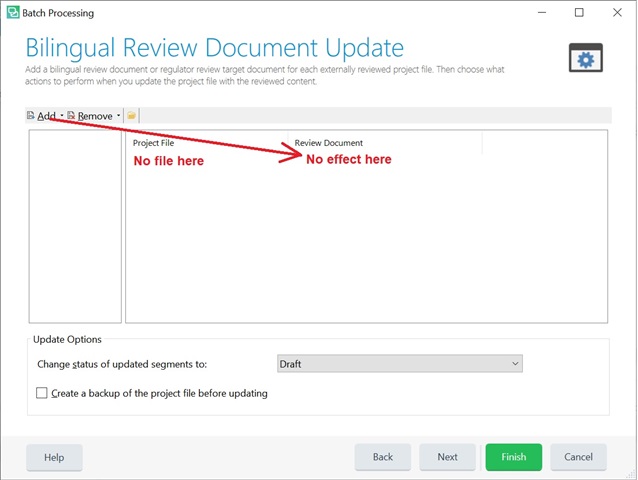
Screenshot of Trados Studio's Bilingual Review Document Update window showing empty Project File section and non-responsive Review Document section.


Generated Image Alt-Text
[edited by: Trados AI at 6:31 PM (GMT 0) on 28 Feb 2024]

emoji
Parents
  • Hello

    The bilingual review process only works with the following files: the sdlxliff file, from which the bilingual review document was generated, and the bilingual review document in .review.docx extension.

    I am not quite sure why you would like to use mxliff file directly in Studio?
    It would work better if you could process the original source file in Studio, generated a bilingual review and then update the file from it.

    Hoping to hear back from you.

    Best wishes,
    Greta

  • Hi Greta,

    Thank you for your reply. I did not expect that but I will keep it in mind next time.

    According to my understanding, Studio generates sdlxliff file(s) from any supported source file(s) be that docx or mxliff, right? If yes, then why can't it work with a "bilingual review document in .review.docx extension" from mxliff's sdlxliff, but with "bilingual review document in .review.docx extension" from docx's sdlxliff it can?

    Both mxliff and docx files are supported. Both mxliff and docx files generate sdlxliff. Then why the bilingual review process only works with docx.sdlxliff but not with mxliff.sdlxliff? =)

    The bilingual review process successfully generated the review.docx file from mxliff.sdlxliff either. However, the problem arises when it comes to importing back from the review.docx file. If it can't import, then why on erth it can export?

    I used mxliff file directly in Studio because it is in the list of supported file types. I expected there would be no difference (be it docx, pdf, json or mxliff) as long as they are all declared as supported. Also, I expected that Memsource and Studio might have different segmentation rules, and I chose mxliff to avoid superfluous work that might arise from different segmentation. 

Reply
  • Hi Greta,

    Thank you for your reply. I did not expect that but I will keep it in mind next time.

    According to my understanding, Studio generates sdlxliff file(s) from any supported source file(s) be that docx or mxliff, right? If yes, then why can't it work with a "bilingual review document in .review.docx extension" from mxliff's sdlxliff, but with "bilingual review document in .review.docx extension" from docx's sdlxliff it can?

    Both mxliff and docx files are supported. Both mxliff and docx files generate sdlxliff. Then why the bilingual review process only works with docx.sdlxliff but not with mxliff.sdlxliff? =)

    The bilingual review process successfully generated the review.docx file from mxliff.sdlxliff either. However, the problem arises when it comes to importing back from the review.docx file. If it can't import, then why on erth it can export?

    I used mxliff file directly in Studio because it is in the list of supported file types. I expected there would be no difference (be it docx, pdf, json or mxliff) as long as they are all declared as supported. Also, I expected that Memsource and Studio might have different segmentation rules, and I chose mxliff to avoid superfluous work that might arise from different segmentation. 

Children