You are currently working on UAT 

Is Trados Studio 2019 very much different from Trados Studio 2017?

I have not been working a lot with Trados 2017 for the last 3 years and if I did, it was rather on a simple level, only with files and my own TMs or with packages from clients with integrated TMs and glossaries. Actually I am having a new client where I need to work with Trados again and on a deeper level which requires more knowledge and handling of tools like connecting to worldserver, generating glossaries in the Glossary Converter etc. Again and again I am finding myself with technical issues (cannot connect to worldserver, glossary converter does not work or any other error messages) and it takes me ages to find the reason or I do not find it. Maybe some of the issues also have to do with the fact, that I work on Mac in the virtual machine Paralells and Windows 10 installed on it. Therefore I thought to buy a support package from SDL for one year to make sure, that I get immediate help when I face these problems. But I cannot get a support package for Trados 2017, only for 2019 version. My question to those who made the step from Trados 2017 to 2019:

1. Do these versions differ a lot? Was is easy or a challenge to get into the new version? 

2. SDL Chat support told me that I can have both versions installed. Are there any inconveniences with having 2 versions installed on my Mac? Could that create another issue?

Thanks and looking forward to hearing from you.

  • Hi 

    I didn't reply to this because I don't work on a Mac AND I work locally, not via GroupShare but as nobody has replied to you yet, I thought I should share my thoughts about the transition from 2017 and 2019 on a PC.

    The changeover for me was easy. I started with the first beta version and liked it so much that I didn't just experiment with it, I started using it for all my work straight away. The biggest agency I work for did not make the change until very recently but my working in Studio 2019 on their projects created in Studio 2017 created no problems at all. Apart from a bookmark error message on opening each project but that wasn't a problem, just click then ignore it. You can disable bookmarks if it annoys you. 

    The 2019 interface on PC looks almost identical to 2019, though it has more functionality. 

    Having 2017 and 2019 on the same computer has never caused a problem. You will need the correct version of MultiTerm that goes with each of them, however.

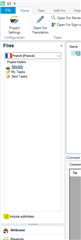
    I didn't really notice just how much better 2019 is than 2017 until I went back to working in 2017 on a colleague's computer. Then I missed the extra features of 2019 very much. The best feature for me is that if you have a project with multiple folders containing multiple files, you can tick this box to be able to see them all AND open them all in a 'virtual merge':

    Screenshot of Trados Studio interface showing the Files view with a project expanded to display subfolders 'Source Files' and 'Target Files'.

    I hope this helps!

    All the best,

    Ali Slight smile

    emoji


    Generated Image Alt-Text
    [edited by: Trados AI at 6:21 PM (GMT 0) on 28 Feb 2024]
  • Hi 

    I'm posting this separately because it was written by :

    Designed with user experience at its core, SDL Trados Studio 2019 transforms how new users get up and running, helps experienced users make the most of the powerful features, ensures new levels of productivity for the whole translation team and helps in delivering unrivalled quality in your translations.

    What’s New in SDL Trados Studio 2019:


    • Get started easily with on-demand tips and tutorial videos: From the moment you open SDL Trados Studio 2019, you are guided through each area with tips, tricks and tutorial videos showing you how to create and manage projects, use the translation editor, and get the most out of your translation assets.
    • Instant access to every feature and setting with 'Tell Me' technology: Did you know Studio 2019 has over 700 commands and 1300 settings, that’s a lot of functionality. Our new ‘Tell Me’ technology helps you access a setting 4x faster. Tell Studio exactly what you need to know: simply type in a word or phrase, and Studio 2019 intelligently suggests commands, options and settings that you might want to access.
    • Effortless project creation and simple project updates: Create projects up to 28% faster with the brand new one step project creation wizard. Adding and updating specific files mid-project is also now a much quicker and pain-free process – up to 82% faster than Studio 2017.
    • Enhanced quality checks: Studio 2019 introduces the option to customize settings for each language, increasing your flexibility and control over quality assurance (QA) checks. When you run a QA check in Studio 2019, the source and target segment are now included in the report, so you can see at a glance exactly where each error occurs.
    • Improved translation memory (TM) management: With Studio 2019, you have more control over the Translation Memories Editor: you can now view up to 1000 translation units per page, navigate to a specific page or directly to the last page of a TM, meaning it’s quicker and easier to sort through your TMs, change and update translations

    If you are a Freelance Translator, click here to find out more about the new features in SDL Trados Studio 2019.

    If you are a Language Service Provider, click here to find out more about the new features in SDL Trados Studio 2019.

    If you are a Corporate Language Department, click here to find out more about the new features in SDL Trados Studio 2019.

    Here's a video on what's new...

    /cfs-file/__key/communityserver-discussions-components-files/90/Whats-new-in-Studio-2019_5F00_V7.mp4

  • Former Member
    Former Member

    what is the problem with version 2017 exactly ?

    what is the exact reason that you have to buy version 2019 ?

    in my case, very clear.

    I do not have any kind of problem with version 2017 and I do not hav any reason to buy version 2019.

    I do not have any kind of direct experience with version 2019, so I can not give you the specific wordings but, you'd better check out "Bad" reputations too. When you have to your serious job, the bad problems will kill you. On the contrary sweet wordings are not that much problem.

    Right ?