You are currently working on UAT 

This discussion has been locked.
You can no longer post new replies to this discussion. If you have a question you can start a new discussion

Licence activation/deactivation Studio 2017

Hello !

Two days ago, my computer crashed and I had to reinstall Windows. After the reinitialisation, I reinstalled all my applications, SDL Trados Studio 2017 included. What I didn't know is that I apparently had to deactivate my licence on my SDL account before reinstalling Studio on my computer. Now I am in trial mode and cannot deactivate my licence to activate a new one again. And I don't know what will happen when the trial mode will end. Should I uninstall Studio to be able to deactivate my licence through the SDL account and then reinstall it?

I don't really know what to do as it is the first time I had to reinstall Studio, so thanks for your advice!

Elise


[locked by: Steven Whale at 10:21 AM (GMT 1) on 19 Sep 2019]
Parents
  • Hi

    Further to the instructions by
    If you find that you can't make the 'Return License' work via your account page, don't worry... you can contact the SDL licensing help team free of charge online, here:
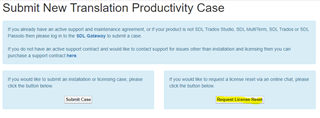
    Here's how it looks:

    Trados Studio 'Submit New Translation Productivity Case' page with two options: 'Submit Case' and 'Request License Reset'.
    Click on 'Request License Reset' and a live chat form should pop up, through which you can give details and someone will chat with you live.
    If for any reason that doesn't happen, click on 'Submit Case' and a longer form will pop up. Fill out all the details, selecting 'Licensing' at the 'Case type' line and giving your email address accurately as this is how you will be contacted. Licensing issues are always dealt with within 24 hours.
    All the best,
    Ali Slight smile
    emoji


    Generated Image Alt-Text
    [edited by: Trados AI at 6:20 PM (GMT 0) on 28 Feb 2024]
Reply
  • Hi

    Further to the instructions by
    If you find that you can't make the 'Return License' work via your account page, don't worry... you can contact the SDL licensing help team free of charge online, here:
    Here's how it looks:

    Trados Studio 'Submit New Translation Productivity Case' page with two options: 'Submit Case' and 'Request License Reset'.
    Click on 'Request License Reset' and a live chat form should pop up, through which you can give details and someone will chat with you live.
    If for any reason that doesn't happen, click on 'Submit Case' and a longer form will pop up. Fill out all the details, selecting 'Licensing' at the 'Case type' line and giving your email address accurately as this is how you will be contacted. Licensing issues are always dealt with within 24 hours.
    All the best,
    Ali Slight smile
    emoji


    Generated Image Alt-Text
    [edited by: Trados AI at 6:20 PM (GMT 0) on 28 Feb 2024]
Children