You are currently working on UAT 

Merged segments not showing merged text

I have had to merge segments – and now find that while everything looks good in the source and target in Trados, when I hit preview [source or target] the rest of the sentence – except the first line, or the orgignal first segment – has disappeared: any ideas how to fix this?

[IE] 3 merged segemnts, for example, forming one full sentence in both source and target in Trados, only display the first line [presumably the initial segment] for both source and target in both html and embedded preview.

Parents
  • Former Member
    0 Former Member

    ah.. found it

    It is not related with the Merge

    It is the problem of "some kind of MS Word vertical arrangement", I guess..

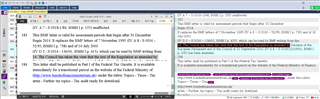
    Screenshot of Trados Studio showing a document with vertical text alignment issue in MS Word, causing display problems in the translation software.

    emoji


    Generated Image Alt-Text
    [edited by: Trados AI at 6:09 PM (GMT 0) on 28 Feb 2024]
  • Former Member
    0 Former Member in reply to Former Member

    It is a TABLE, the height of CELL has restriced with unknown reason.

    Just let it go, then you will be happy again

    Bye..

  • It really doesn't help to look down on me and say "you have no idea about the technicalities". If I bought a BMW that gave conflicting readouts, I wouldn't expect to be sneered at by a BMW technician... Hopefully I would get it fixed. 

    Nor would I expect or be interested in known "notorious" problems. 

    Nor do I know for a fact that this came from a PDF... But from the way the lines are broken up it would appear blazingly obvious... Again, it's like taking the beamer back to the garage and them expecting you to tell them how the engine was originally constructed.

    I'm a simple translator, trying to get a solution, that's all.  I've used pdfs and word countless times without problems.

    And if I had a PDF or the doc file, without trados, I would be fine.

    Which puts the ball back in the Trados court, since it either falsely shows merged and translated text in the editor view or falsely shows missing text in the preview. Blame whatever you want, but this problem continues unresolved.

    And if I wasn't using Trados I wouldn't have this problem.

  • If you'd buy a BMW with LHD, you will have a bit of trouble driving it in the UK. And if the car needs gasoline and you fill it up with diesel, it will end in a disaster. When you drive the car and it has a manual gearshift, you'll damage the engine, when you swicth the 2. gear while driving 200.

    What you get from Studio are not conflicting readouts, but a file formatted as the source was. The problem here is, that you seem not to accept, that the software has its limits, which are no problem, if you know how it works. Same as with the car - it delivers what you expect, if used properly.

    _________________________________________________________

    When asking for help here, please be as accurate as possible. Please always remember to give the exact version of product used and all possible error messages received. The better you describe your problem, the better help you will get.

    Want to learn more about Trados Studio? Visit the Community Hub. Have a good idea to make Trados Studio better? Publish it here.

  • But you DO show it in preview and you DO save it in the target too...
    It's all about just the bad formatting of the source and the VISUAL(!!!) result...

    I disagree Evzen.  The reason this is a problem is because of the way Studio handles the merged segments.  By adding more content into the first row it no longer fits.  There must be a smarter way to deliver this so that we allow the merge and put the content back into two rows.  I there could be difficulties in deciding which part of the translated text goes into which row but I'm sure doing something smart (maybe counting chars for example) could help to solve an issue like this this.

    If we solved it then we would go some way towards solving the problem seen when people merge in markup files too.

    I know in this case the source is a pile of crap, but I also think there is a real problem to try and solve here, and not by repairing the target file afterwards as this is only something you could do after seeing it needs to be done.  If the merge was handled in a smarter way, and I know this is actually very difficult to achieve because of the way we work with files, then a repair of the target file might not be needed at all.

    Paul Filkin | RWS

    Design your own training!
    You've done the courses and still need to go a little further, or still not clear? 
    Tell us what you need in our Community Solutions Hub

  • Make a virtual merge for that - instead of physically moving the text into the first cell like it is done now, simply connect the segments only for TM purposes, but leave them in the cells like is.

    Such kind of merge would be done AFTER having inserted all the translations row by row and then selecting the segments to be merged virtually. As this would not change the structure of any kind of file, it should work literally for all file formats.

    So Studio would then be able to physically merge segments or to merge them virtually. Virtual merge should be available all the time, merging across paragraph breaks should be optional as it is now. There should be a warning when switching it on, telling to take care of the merged segment in the final file and to make sure the file format does support such a merge.

    _________________________________________________________

    When asking for help here, please be as accurate as possible. Please always remember to give the exact version of product used and all possible error messages received. The better you describe your problem, the better help you will get.

    Want to learn more about Trados Studio? Visit the Community Hub. Have a good idea to make Trados Studio better? Publish it here.

  • Just leaves the problem of deciding which part of the translation goes into which segment.  Can be done mathematically, but this may not be the rght way, so some editing would be required.

    But you can see this isn't a simple solution, and the more we talk about it the more I'm inclined to think it wont happen... as much as I'd like it to.  The effort, compared to the number of times this is needed, don't really match.  So even if everyone thinks it's a good idea it will always get a lower priority than anyting else.

    Paul Filkin | RWS

    Design your own training!
    You've done the courses and still need to go a little further, or still not clear? 
    Tell us what you need in our Community Solutions Hub

  • The reason this is a problem is because of the way Studio handles the merged segments.  By adding more content into the first row it no longer fits.

    Nope... as I demonstraed on my screenshot, it has NOTHING to do with the merging.

    The problem appears even if you translate each segment separately - when the translation gets longer than can fit in the fixed space, it "disappears".

    Just look at the screenshot with the two marked segments where the barely-visible traces/artifacts of the text are marked.

  • It really doesn't help to look down on me

    I'm not looking down on you. I'm just stating the pure truth.
    It may not sound pleasant, but that's not my fault. It's just a naked truth; it doesn't always sound good.

    Nor do I know for a fact that this came from a PDF

    Hmmm, how comes then that YOU mentioned that fact yourself:

    As with many projects worldwide, a pdf was machine translated and the bilingual file sent to me for post-editing.

    And if I had a PDF or the doc file, without trados, I would be fine.

    But you DO have the DOC file! You can save it from Studio using Advanced Save... didn't you know that?

    And if I wasn't using Trados I wouldn't have this problem.

    You mean, if you would be typing in the Word file directly?
    Then you would have exactly the same problem, just try it...

    Or you mean, if you would use different CAT tool?
    Then I truly believe that you would have exactly the same problem either, because the cause is the source Word.

  • Nope... as I demonstraed on my screenshot, it has NOTHING to do with the merging.

    I probably didn't explain that well.  But the "merging" across paragraph breaks is not a true merge.  What we do, as I'm sure you know, is we cut the content out of the second segment, hide it, and add the content to the first segment.  So when I say this is about how we are merging segments that's what I mean.

    Paul Filkin | RWS

    Design your own training!
    You've done the courses and still need to go a little further, or still not clear? 
    Tell us what you need in our Community Solutions Hub

  • Yes, I understand ;-)

    And I'm saying that this has absolutely nothing to do with the problem.
    Because even the original untouched, only autotranslated, document has the target text "invisible"... simply because the translation (in single, not merged, segment) is longer than what can fit in the fix-sized table cell.

    And there is absolutely nothing Studio can do about it.
    What may be fine and required by one (i.e. letting the table cells to autosize) can be a big problem for someone else.

    In fact it's all rather a Word problem - wouldn't you expect that Word actually indicates somehow that there is actually more text, but it's not visible because it doesn't fit in the cell?!

  • Because even the original untouched, only autotranslated, document has the target text "invisible"... simply because the translation (in single, not merged, segment) is longer than what can fit in the fix-sized table cell.

    ok.  From that perspective you are correct.  Sorry, I misunderstood what you meant.  In this case the problem is completely down to the Word file and DtP is required as it would be with any localization task where there are boundries around the space available for text.

    Paul Filkin | RWS

    Design your own training!
    You've done the courses and still need to go a little further, or still not clear? 
    Tell us what you need in our Community Solutions Hub

Reply Children
No Data