You are currently working on UAT 

Merged segments not showing merged text

I have had to merge segments – and now find that while everything looks good in the source and target in Trados, when I hit preview [source or target] the rest of the sentence – except the first line, or the orgignal first segment – has disappeared: any ideas how to fix this?

[IE] 3 merged segemnts, for example, forming one full sentence in both source and target in Trados, only display the first line [presumably the initial segment] for both source and target in both html and embedded preview.

Parents Reply
  • Even if there was some invisible table, surely the merge would have merged the segments - i.e. the cells? Again, the source AND target text both only show the first line of text after merging... so the merge function seems to have removed the text in segments 2 and 3, for example - both in the preview and in the F12 target file - ...even though it all looks good if the sdlxliff file is opened in Trados...

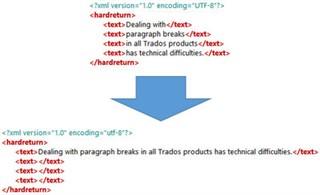
    If you merged across parapgrah segments this could be the cause of the issue... because it's a hack.  That's where Jerzy is coming from by asking about table cells for example.  There was a reason why Trados never supported merging across paragraph breaks for years and the eventual implementation was an automation of simply taking the text out of the subsequent source segments and copy/pasting into the first one.

    If there are tags between they will be left where they are and the content between them will now be missing.  This is explained here:

    https://multifarious.filkin.com/2016/11/21/bridging-the-divide-merging-segments/

    So for some filetypes it's not a good idea to enable merging across para segments.  In this case, woth word, it's fne.  But it seems the preview is broken as mentioned before.

    Paul Filkin | RWS

    Design your own training!
    You've done the courses and still need to go a little further, or still not clear? 
    Tell us what you need in our Community Solutions Hub

Children