
 Translate



I have created a project and translated a *.doc file.
I have sent the *.doc for proofreading and now I have received it back. I wanted to import the proofread file using Retrofit, but as soon as I click on the corresponding icon, I get this popup.
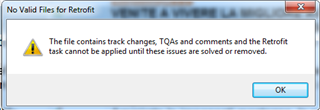
My *.sdlxliff contains no changes, I did ' Accept all changes' and the Track Changes option is deselected.
I don't even get to the point where I should be selecting the proofread *.doc. What am I doing wrong?
Thanks
Generated Image Alt-Text
[edited by: Trados AI at 6:04 PM (GMT 0) on 28 Feb 2024]



