 Translate



I have tried entering
“e.g.” and “g.” for “Exceptions” at
Options -> Editor -> AutoCorrect
This does not help.
You are currently working on UAT

I have tried entering
“e.g.” and “g.” for “Exceptions” at
Options -> Editor -> AutoCorrect
This does not help.
Looks a bit buggy to me so I have logged it with support. However, I also found a workaround that works for me.
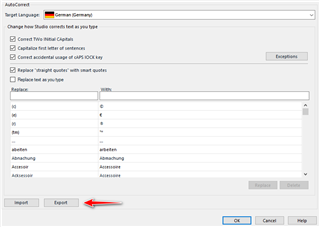
1. Export your list of autocorrections (I know I used Germany... make sure you use the right language for the task):
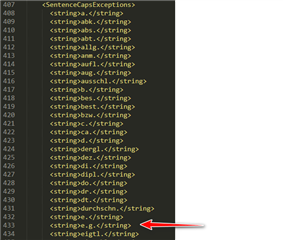
2. Edit the exported file:
3. Import the edited file
After this it worked for me immediately. It seems like a refresh issue and my guess is a restart of Studio might also do the same job.
Paul Filkin | RWS
Design your own training!
You've done the courses and still need to go a little further, or still not clear?
Tell us what you need in our Community Solutions Hub

Looks a bit buggy to me so I have logged it with support. However, I also found a workaround that works for me.
1. Export your list of autocorrections (I know I used Germany... make sure you use the right language for the task):
2. Edit the exported file:
3. Import the edited file
After this it worked for me immediately. It seems like a refresh issue and my guess is a restart of Studio might also do the same job.
Paul Filkin | RWS
Design your own training!
You've done the courses and still need to go a little further, or still not clear?
Tell us what you need in our Community Solutions Hub

Thanks Paul
But for some reason it does not work for me, even after restarting Studio. I checked that my edited entry is contained in the Exceptions list after the import. It does work if the word is entered directly after e.g.p but not e.g, P
I have the impression that this "feature" was introduced with the latest version, because I cannot remember there being a problem with previous versions. But with increasing age, memory is not always what it was!
